What is DiskSavvy?
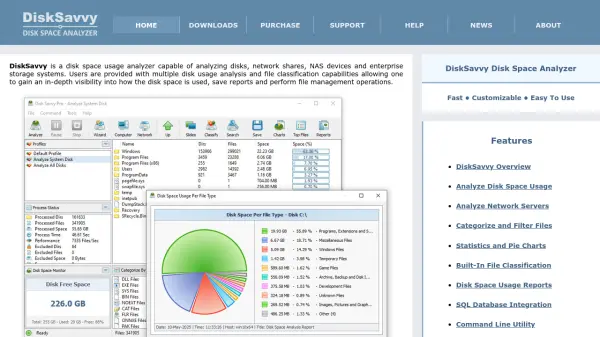
DiskSavvy is a powerful disk space usage analyzer designed to provide in-depth visibility into how disk space is used across local disks, network shares, NAS devices, and enterprise storage systems. It offers multiple disk usage analysis and file classification capabilities, enabling users to categorize and filter files, generate detailed reports with statistics and pie charts, and perform file management operations.
The tool supports SQL database integration, a command line utility, and a server version for enterprise environments. Recent updates have added support for new file types, improved pie charts, and enhanced report filtering by report ID, making it a versatile solution for managing storage efficiently.
Features
- Analyze Disk Space Usage: Scan local disks, network shares, NAS devices, and enterprise storage systems.
- Categorize and Filter Files: Organize files by type, size, and other attributes for targeted analysis.
- Statistics and Pie Charts: Visual representation of disk usage with detailed statistics.
- Built-In File Classification: Automatically classify files into predefined categories.
- Disk Space Usage Reports: Generate PDF, HTML, CSV, JSON, and XML reports.
- SQL Database Integration: Export reports to SQL databases for centralized storage.
- Command Line Utility: Automate analysis tasks via command-line interface.
- DiskSavvy Server: Centralized disk analysis for enterprise environments with web-based interface.
Use Cases
- Identify large files and folders consuming disk space on local drives.
- Monitor and manage storage usage on network shares and NAS devices.
- Generate compliance reports with hash signatures for audited directories.
- Analyze disk usage per user or per host in enterprise environments.
- Schedule periodic disk analysis jobs to track storage trends over time.
FAQs
-
What types of storage can DiskSavvy analyze?
DiskSavvy can analyze local disks, network shares, NAS devices, and enterprise storage systems. -
Does DiskSavvy support automated disk analysis?
Yes, DiskSavvy offers a command line utility and a server version that supports periodic analysis jobs and automated report generation. -
Can DiskSavvy generate reports in different formats?
Yes, it can generate reports in PDF, HTML, CSV, JSON, XML, and text formats. -
Is there a server version for centralized management?
Yes, DiskSavvy Server provides centralized disk analysis with a web-based interface, batch analysis, and disk space monitoring.