What is DGB.LOL?
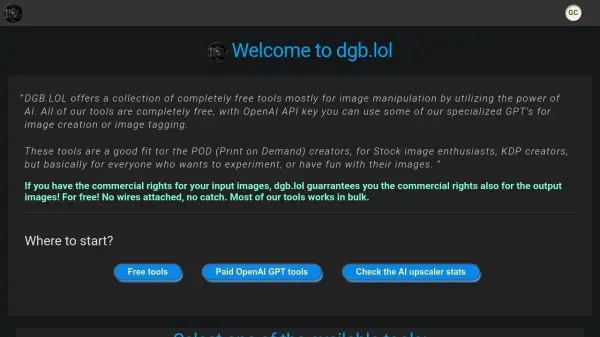
Offers a collection of free tools primarily focused on image manipulation using artificial intelligence. These tools cater to Print on Demand (POD) creators, stock image enthusiasts, KDP creators, and anyone interested in experimenting with or enhancing their images. Users retain commercial rights for output images if they possess commercial rights for the input images, at no cost. Many of the tools support bulk processing for efficient workflow.
Specialized GPTs for image creation and tagging are available for users with their own OpenAI API key, alongside a variety of free image enhancement tools like upscalers, retouching tools, background removers, and converters (RGB to CMYK, image to vector, DPI enhancer, image type converter, SVG to EPS). Tools like the Midjourney Splitter and Midjourney-Zoom specifically address needs related to Midjourney image grids.
Specialized GPTs for image creation and tagging are available for users with their own OpenAI API key, alongside a variety of free image enhancement tools like upscalers, retouching tools, background removers, and converters (RGB to CMYK, image to vector, DPI enhancer, image type converter, SVG to EPS). Tools like the Midjourney Splitter and Midjourney-Zoom specifically address needs related to Midjourney image grids.
Features
- AI Image Upscaler: Upscale images from 2x to 8x using AI, with bulk mode available.
- Midjourney Splitter: Splits and upscales selected images from Midjourney preview grids (2x-8x).
- AI Background Remover: Automatically detects and removes image backgrounds, supports bulk processing.
- AI Image To Vector: Converts raster images into vector formats (SVG, EPS, AI, PDF) with bulk mode.
- Bulk Processing: Many tools support processing multiple images simultaneously.
- Re-Imagine: Upscales and modifies images based on user instructions.
- AI Retouch: Improves image quality and details.
- Coloring Book Creator: Converts illustrations into coloring book images.
- RGB to CMYK Converter: Converts image color profiles for print.
- DPI Enhancer: Changes the DPI of images, supporting bulk mode.
- Paid OpenAI Tools: Access to specialized GPTs like DALL-E 3 image generation and Stock Image Tagger (requires user's OpenAI API key).
Use Cases
- Enhancing image resolution for print or digital use.
- Preparing images for Print on Demand (POD) products.
- Creating vector graphics from raster images for scalable designs.
- Removing backgrounds from product photos or portraits.
- Batch processing images for stock photo submissions.
- Improving the quality and detail of existing images.
- Converting illustrations into coloring book pages.
- Adjusting image DPI for specific platform requirements.
- Generating images from text prompts using DALL-E 3.
- Automatically tagging stock images with relevant keywords and titles.
FAQs
-
Are the tools on DGB.LOL completely free to use?
Most tools are completely free. Some specialized GPT tools for image creation or tagging require your own OpenAI API key, which involves costs associated with OpenAI usage. -
Can I use the output images commercially?
Yes, if you have the commercial rights for your input images, DGB.LOL guarantees you the commercial rights for the output images generated by the free tools. -
Do the tools support processing multiple images at once?
Yes, many of the tools offer a bulk mode for processing multiple images simultaneously. -
What are the paid tools available?
Paid tools include Pocket DALL-E 3 for image generation and Stock Image Tagger for adding metadata. These require users to provide their own OpenAI API key. -
Who are these tools intended for?
The tools are suitable for POD (Print on Demand) creators, stock image enthusiasts, KDP creators, and anyone looking to experiment with or enhance their images using AI.