Designyff favicon

Designyff
Unlock the Power of Creativity

What is Designyff?

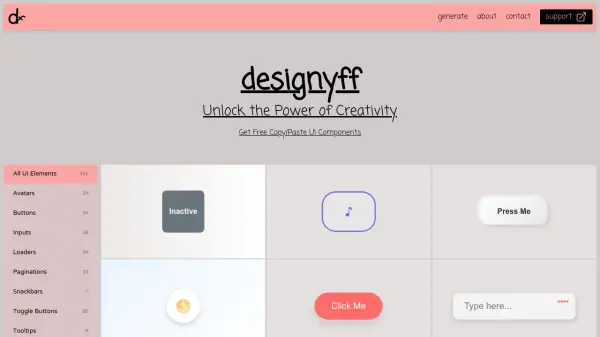
Designyff provides a comprehensive collection of free open-source UI components and snippets that users can easily copy and paste into their projects. The platform offers various UI elements including avatars, buttons, inputs, loaders, paginations, snackbars, toggle buttons, and tooltips, totaling 151 components across different categories.

This tool enables designers and developers to quickly integrate pre-built UI elements into their work, saving time and effort while maintaining consistency and quality in web design. Users can access these resources without cost, making it accessible for various projects and skill levels.

Features

  • Free Open-Source Components: All UI elements are available at no cost with open-source licensing
  • Copy/Paste Functionality: Users can easily copy and paste components directly into their projects
  • Comprehensive UI Library: Offers 151 UI components across multiple categories including avatars, buttons, and inputs
  • Category Organization: Components are organized into specific categories for easy navigation and discovery

Use Cases

  • Quickly adding UI elements to web development projects
  • Prototyping user interfaces without building components from scratch
  • Finding design inspiration for UI component implementation
  • Learning UI design patterns through practical examples

Related Tools:

Blogs:

  • Best text to speech AI tools

    Best text to speech AI tools

    Text-to-speech (TTS) AI tools are designed to convert written or text-based content into natural-sounding spoken audio. These tools utilize various deep learning and neural network architectures to generate human-like speech from textual input.

  • Top 6 AI note-taking tools for 2026: in-person, online, and hybrid use cases

    Top 6 AI note-taking tools for 2026: in-person, online, and hybrid use cases

    Most AI note-taking lists are really lists of meeting bots, which join your video call and transcribe it. That's useful, but it's half the picture. Decisions happen in hallway conversations, client dinners, on-site visits, and hybrid rooms where nobody is on a video link. This guide covers different parts of the note-taking workflow: hardware capture for in-person settings, platform-native tools for online calls, and AI layers for organizing and synthesizing what you've captured. It compares six tools by capture context, workflow fit, pricing, and limitations.

  • Best AI tools for recruiters

    Best AI tools for recruiters

    These tools use advanced algorithms and machine learning to automate tasks such as resume screening, candidate matching, and predictive analytics. By analyzing vast amounts of data quickly and efficiently, AI tools help recruiters make data-driven decisions, save time, and identify the best candidates for open positions.

Didn't find tool you were looking for?

Be as detailed as possible for better results