Class Timetable favicon

Class Timetable
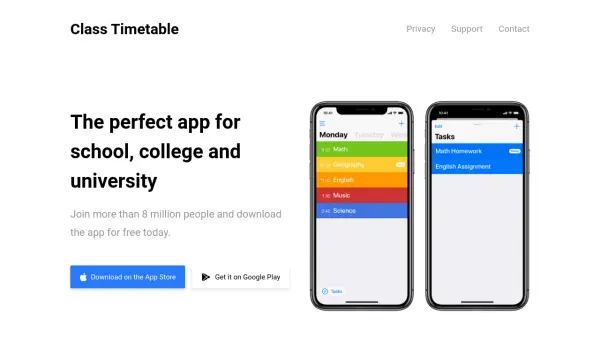
The perfect app for school, college and university

What is Class Timetable?

Class Timetable is a mobile application designed to assist students in organizing their academic schedules. It provides a user-friendly interface with a calendar display and supports multiple weeks, making it easy to view class timetables. The app also includes features for tracking homework and assignments, allowing users to add notes, set reminders, and categorize tasks.

Additionally, Class Timetable offers notifications for class reminders, Apple Watch support, and a Notification Center widget for quick access to schedules. It has been downloaded by over 8 million users and is available for free on the App Store and Google Play, catering to students in school, college, and university settings.

Features

  • Calendar Display: View schedules with a calendar interface and multi-week support
  • Task Organization: Track homework and assignments with notes, reminders, and categories
  • Notifications: Receive class reminders with Apple Watch support and a Notification Center widget

Use Cases

  • Managing class schedules for school, college, or university
  • Tracking homework and assignments with reminders
  • Accessing timetables quickly via Apple Watch or widgets

Related Tools:

Blogs:

  • Best ai tools for Twitter Growth

    Best ai tools for Twitter Growth

    The best AI tools for Twitter's growth are designed to enhance user engagement, increase followers, and optimize content strategy on the platform. These tools utilize artificial intelligence algorithms to analyze Twitter trends, identify relevant hashtags, suggest optimal posting times, and even curate personalized content.

  • Best AI tools for Room Design

    Best AI tools for Room Design

    Discover cutting-edge AI tools that redefine the art of room design. From layout optimization to aesthetic finesse, these top-tier tools enhance your space to new heights.

  • Top 6 AI note-taking tools for 2026: in-person, online, and hybrid use cases

    Top 6 AI note-taking tools for 2026: in-person, online, and hybrid use cases

    Most AI note-taking lists are really lists of meeting bots, which join your video call and transcribe it. That's useful, but it's half the picture. Decisions happen in hallway conversations, client dinners, on-site visits, and hybrid rooms where nobody is on a video link. This guide covers different parts of the note-taking workflow: hardware capture for in-person settings, platform-native tools for online calls, and AI layers for organizing and synthesizing what you've captured. It compares six tools by capture context, workflow fit, pricing, and limitations.

Didn't find tool you were looking for?

Be as detailed as possible for better results