What is Carom?
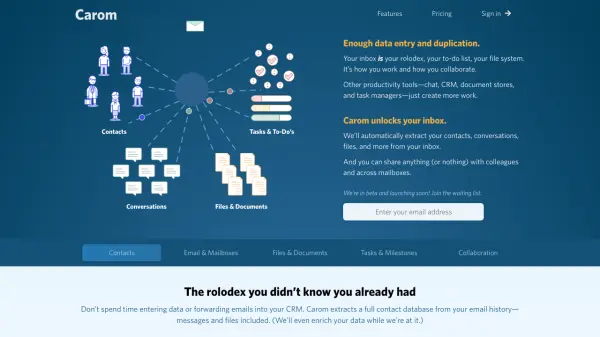
Carom is designed to enhance productivity by transforming a user's inbox into a centralized hub for contacts, conversations, files, and tasks. It addresses the common issue of data entry and duplication across various productivity tools like chat, CRM, document stores, and task managers by automatically extracting essential information directly from email history. This process allows users to bypass manual organization and focus on their core work.
The platform offers robust features for managing communications and workflows. It provides an email client specifically built for productivity, enabling users to easily see contacts associated with emails, snooze messages, mark them as resolved, or add tasks to their agenda. Carom also facilitates collaboration by allowing users to share entire mailboxes or individual items like contacts, emails, and files with colleagues, ensuring everyone is on the same page for support histories, sales discussions, and other shared responsibilities.
Features
- Automated Contact Extraction: Automatically extracts a full contact database from email history, including messages and files, and enriches data.
- Productivity-Focused Email Client: See contacts associated with emails, snooze messages, mark as resolved, or add tasks to an agenda, with sortable priorities.
- Automatic File Organization: Manages all sent and received attachments, showing who received what and when, with browser previews.
- Integrated Task Management: Provides a daily and weekly agenda of to-do’s, grouped into milestones and assignable to team members.
- Collaboration Tools: Share entire mailboxes or individual contacts, emails, and files with colleagues for shared access to information.
Use Cases
- Centralizing customer communication and history for sales teams.
- Managing shared inboxes for customer support and service requests.
- Organizing project-related documents and communications for project managers.
- Streamlining individual productivity by integrating email, contacts, files, and tasks.
- Improving team collaboration by sharing relevant information from individual inboxes.
FAQs
-
What happens if I want to add users or mailboxes?
You can add and remove users or mailboxes at any time. We’ll prorate any charges, so if you add users or mailboxes during the month, you only pay for the time you use. -
Can I add a user without a mailbox?
Yes, those users can always access shared mailboxes, like your support queue or sales inbox. -
How do I cancel my account?
You can cancel easily, right from the app, any time, no questions asked, and no need to talk to a human being. -
Is there a discount for paying annually?
Right now Carom only offers annual payment for accounts with 50+ users or mailboxes. If that’s you, you should contact them to discuss. -
How is the monthly fee calculated?
Your monthly fee is made up of a base rate of $19/month, a $9 payment for each mailbox after your first, a $5 payment for each user after your first, and a 2.5¢ payment for each contact enrichment after (100 x your mailbox count) each month.