What is Cacher?
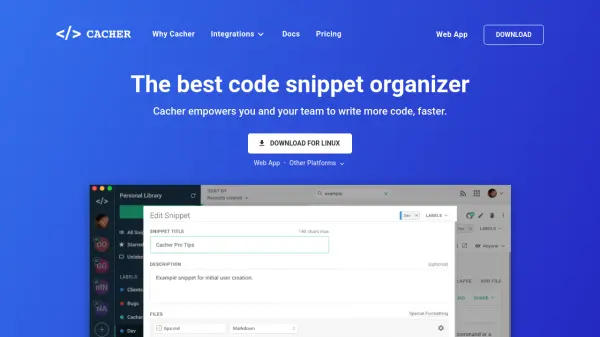
Cacher is a professional-grade solution for managing and sharing code snippets, empowering individual programmers as well as development teams to streamline their workflow. Users can store code snippets, attach files, label content flexibly, and access their knowledge base from a variety of integrated development environments and browsers. The tool synchronizes snippets, supports Markdown editing, and enables sharing via cloud, making collaboration fast and reliable.
Cacher offers plugin integration with popular editors such as Visual Studio Code and IntelliJ, in addition to browser and chat integrations for maximizing productivity. With advanced team features including role management, code reviews, and enterprise SSO, Cacher is tailored for organizations seeking an efficient and organized approach to documentation and code sharing.
Features
- Flexible Labeling: Color-coded labels for organizing code snippets by project, department, or priority
- Editor & IDE Integrations: Native plugins for Visual Studio Code, IntelliJ Platform, and more
- Sync with GitHub Gist: Bi-directional synchronization with GitHub Gists for seamless integration
- Markdown Support: Edit documentation and snippets with live Markdown preview and attachments
- Multi-Platform Access: Web, macOS, Windows, Linux, and browser extension clients
- Team Collaboration: Shared snippet libraries, role assignments, code reviews, and notifications
- Enterprise Security: Centralized billing and single sign-on (SSO) support for larger organizations
- Quick Create: Rapid snippet creation from clipboard or selected text
- Command-line Interface: Import and manage snippets via CLI for advanced users
- Slack Integration: Create and share snippets directly from Slack channel messages
Use Cases
- Documenting and reusing commonly used code patterns across projects
- Onboarding developers with a shared repository of code snippets and setup instructions
- Education settings where teachers share coding examples and lesson supplements
- Technical support teams storing and sharing troubleshooting scripts or commands
- Marketing specialists organizing and standardizing HTML/CSS code for consistent campaigns
- DevOps engineers managing server commands and deployment scripts
- Data scientists cataloging Jupyter Notebook snippets and data visualization reports
FAQs
-
What platforms does Cacher support?
Cacher is available as a web app, desktop clients for macOS, Windows, Linux, and as extensions for popular browsers and development environments. -
Does Cacher offer team collaboration features?
Yes, Cacher provides shared team libraries, role-based access, code reviews, and notifications for efficient team collaboration. -
Is there a free version of Cacher available?
Yes, Cacher offers a free plan suitable for students and individual enthusiasts, with upgrade options available for professionals and teams. -
Does Cacher integrate with GitHub Gist?
Cacher supports bi-directional synchronization with GitHub Gist, allowing users to import and sync their code snippets. -
Can organizations self-host Cacher?
Yes, a self-hosted instance of Cacher is available for enterprise customers, with annual pricing and support included.