What is beorg?
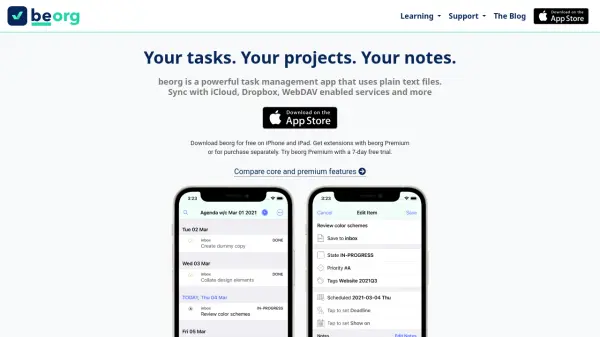
beorg is a powerful task management app for iPhone and iPad that helps you organize tasks, projects, and notes using plain text files with the Org mode syntax. It gives you full control over your data by allowing sync with iCloud, Dropbox, WebDAV, Box, and other file provider apps. With beorg, you can create and edit tasks with dates, priorities, and notes, view a weekly agenda that integrates iOS calendar events, and receive notifications for upcoming deadlines. The app includes an outline editor for organizing content, quick capture from other apps, and PDF export. It also offers scripting capabilities for custom task filters and editor customization. beorg is free to download with optional in-app purchases for premium features like dark mode, saved searches, and Box sync, and you can try beorg Premium with a 7-day free trial.
Features
- Plain Text Files: All data is stored in plain text using Org mode syntax, ensuring future-proof access and compatibility with other text editors.
- Multiple Sync Options: Sync your files with iCloud, Dropbox, WebDAV, Box, and other file provider apps, giving you full control over your data.
- Agenda View: A weekly agenda on iPhone and iPad that shows events from your org files alongside iOS calendar events.
- Notifications: Receive notifications on your iPhone/iPad for upcoming scheduled items and deadlines.
- Task Creation: Easily create and edit tasks with dates, status, priorities, and notes, with an optimised UI for adding schedule and deadline dates.
- Outline Editor: Organize tasks and notes with an outline editor that supports folding and copy/paste between apps.
- Quick Capture: Use the beorg share extension to quickly add text and links from other apps to your inbox.
- PDF Export: Generate PDFs of your outlines with formatting, links, and tables using simple markup syntax.
- Scripting: Use the built-in scripting language to create custom task filters and customise the editor.
- Backups: Automatically keeps up to 7 days worth of backups of your files.
Use Cases
- Managing personal tasks and to-do lists with due dates and priorities.
- Organizing work projects and notes using outlines and plain text files.
- Tracking deadlines and scheduling with a weekly agenda view.
- Capturing ideas quickly from other apps via the share extension.
- Exporting structured notes and task lists as PDFs for sharing or printing.
FAQs
-
Can I use beorg on Android or desktop?
beorg is currently only available for iPhone and iPad. However, because files use plain text Org mode syntax, you can open and edit them with any text editor on other platforms. -
How does beorg sync with cloud services?
beorg supports syncing with iCloud, Dropbox, WebDAV, Box, and other file provider apps. You can choose where your files are stored and keep them up to date across devices. -
What is beorg Premium?
beorg Premium offers additional features like dark mode, saved searches, and Box sync. You can try it free for 7 days, then subscribe monthly or yearly. Alternatively, you can purchase individual extensions. -
Does beorg support notifications for tasks?
Yes, beorg can send notifications to your iPhone or iPad for upcoming scheduled items and deadlines. -
Can I export my notes as PDF?
Yes, beorg allows you to generate PDFs of your outlines. The PDFs can include formatting, links, and tables using simple markup syntax.