What is AutoIdle?
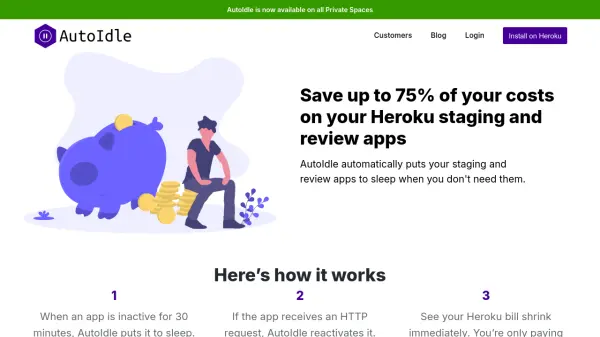
AutoIdle is an intelligent cost-saving solution designed specifically for Heroku users who manage staging and review applications. This AI-powered add-on automatically monitors app activity and puts applications to sleep when they remain inactive for 30 minutes, significantly reducing hosting expenses without requiring manual intervention.
The system reactivates sleeping applications within 5-10 seconds when they receive HTTP requests, ensuring seamless functionality while optimizing resource utilization. Users can track their savings in real-time through the AutoIdle dashboard, which provides detailed insights into app status, scheduled stops, and cost reductions achieved through the service.
Features
- Automatic App Sleeping: Puts inactive Heroku apps to sleep after 30 minutes of inactivity
- Instant Reactivation: Restarts sleeping apps within 5-10 seconds when HTTP requests are received
- Cost Savings Dashboard: Provides real-time tracking of money saved through the service
- Heroku Integration: Seamlessly installs as a Heroku add-on with automatic billing
- Custom Domain Support: Allows users to add custom domains to avoid error messages
Use Cases
- Reducing hosting costs for Heroku staging environments
- Optimizing resource usage for development review apps
- Managing non-critical background applications on Heroku
- Controlling expenses for private space applications
- Automating cost management for development teams
FAQs
-
How does AutoIdle determine when to put an app to sleep?
AutoIdle automatically puts apps to sleep when they remain inactive for 30 minutes without receiving any HTTP requests. -
Can AutoIdle be used with custom domains?
Yes, users can add custom domains through the AutoIdle dashboard to avoid error messages when accessing sleeping apps. -
How is AutoIdle billed to users?
AutoIdle fees are automatically added to the user's monthly Heroku bill based on their selected plan, with no separate payment required. -
What types of Heroku applications work best with AutoIdle?
AutoIdle is designed for staging and review apps, non-critical applications, and background services that don't require constant uptime. -
How quickly can users start seeing cost savings with AutoIdle?
Users can see immediate cost reductions on their Heroku bill as soon as AutoIdle starts managing their app sleeping cycles.