What is Dead Man's Snitch?
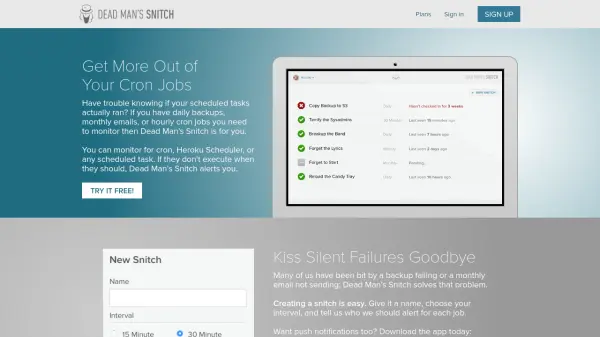
Dead Man's Snitch provides a straightforward solution for monitoring scheduled tasks, including cron jobs and Heroku Scheduler, to prevent silent failures. It alerts users when tasks do not run as expected, helping maintain the reliability of daily backups, monthly emails, or hourly jobs.
Setting up monitoring involves creating a snitch with a name and interval, then using a unique URL to report task execution. The tool supports various plans with features like API access, team management, and integrations, making it suitable for individuals and teams needing dependable task oversight.
Features
- Cron Job Monitoring: Alerts when scheduled tasks like cron jobs fail to run
- Heroku Scheduler Monitoring: Tracks Heroku Scheduler tasks for execution issues
- Simple Setup: Uses unique URLs for each task to report execution in seconds
- Alerting System: Notifies designated contacts when tasks miss their intervals
- API Access: Allows integration with custom applications for monitoring
- Team Management: Supports unlimited team members across plans for collaboration
- Integrations: Connects with other tools for enhanced monitoring capabilities
- Smart Alerts: Provides advanced alerting options for critical monitoring needs
Use Cases
- Monitoring daily backups to ensure they complete successfully
- Tracking monthly email campaigns to confirm delivery schedules
- Overseeing hourly cron jobs for data processing or system maintenance
- Alerting teams when Heroku Scheduler tasks fail to execute
- Preventing silent failures in automated tasks across development and operations
FAQs
-
What types of scheduled tasks can Dead Man's Snitch monitor?
It monitors cron jobs, Heroku Scheduler, and any other scheduled tasks that need execution tracking. -
How do I set up monitoring for a task?
Create a snitch with a name and interval, then use the provided unique URL to report task execution via curl or a browser. -
Does Dead Man's Snitch offer a free plan?
Yes, there is a free plan called 'The Lone Snitch' that includes one snitch for basic monitoring. -
What are the pricing options available?
Plans include Little Birdy at $5/month, Private Eye at $19/month, and Surveillance Van at $49/month, with a free trial available. -
Can I use Dead Man's Snitch with a team?
Yes, all paid plans support unlimited team members for collaborative monitoring.