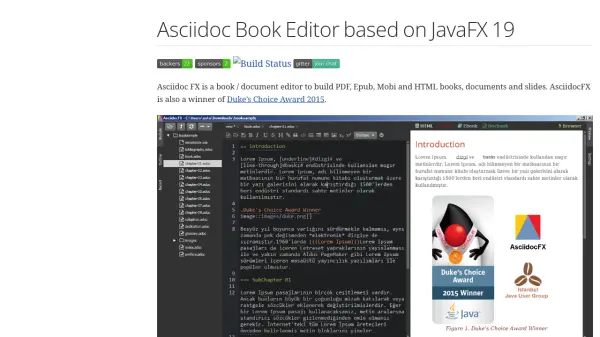
What is AsciidocFX?
AsciidocFX is a comprehensive book and document editor built on JavaFX 19, designed to facilitate the creation of professional publications across multiple platforms. It supports Windows, Mac, and Linux operating systems, providing a versatile solution for authors, developers, and technical writers. The editor converts Asciidoc documents into various formats such as PDF, HTML, EPUB3, Mobi, and DOCBOOK5, leveraging the AsciidoctorJ library for efficient processing.
The tool includes a real-time preview feature, allowing users to see changes instantly as they edit. It supports numerous extensions for enhanced functionality, including PlantUML for UML diagrams, Mermaid for flowcharts, ditaa for ASCII art diagrams, MathJax for mathematical formulas, filesystem tree representations, and JavaFX charts. Additional features include an EPUB viewer, external browser support, table generator, source code highlighter, and themes for dark and white modes. AsciidocFX also integrates with reveal.js and deck.js for creating slides, making it suitable for presentations and educational materials.
Features
- Real-Time Preview: Instantly view changes as you edit Asciidoc documents
- Multi-Platform Support: Compatible with Windows, Mac, and Linux operating systems
- Extension Support: Integrates with PlantUML, Mermaid, ditaa, MathJax, and JavaFX charts for enhanced functionality
- Output Formats: Converts documents to PDF, HTML, EPUB, Mobi, and Docbook
- Slide Creation: Supports reveal.js and deck.js for generating presentation slides
Use Cases
- Creating technical documentation and books
- Generating presentation slides for educational purposes
- Producing e-books in EPUB and Mobi formats
- Developing diagrams and flowcharts for software design
- Writing mathematical formulas and equations in documents
FAQs
-
What operating systems does AsciidocFX support?
AsciidocFX supports Windows, Mac, and Linux operating systems, with specific builds available for each platform. -
How can I install AsciidocFX on Mac?
On Mac, you can install AsciidocFX by downloading the .dmg file and running it, or by using Homebrew with the command 'brew install --cask asciidocfx'. -
What extensions are supported by AsciidocFX?
AsciidocFX supports extensions such as PlantUML for UML diagrams, Mermaid for flowcharts, ditaa for ASCII art diagrams, MathJax for mathematical formulas, filesystem tree, and JavaFX charts. -
Can AsciidocFX create presentation slides?
Yes, AsciidocFX supports slide creation using the Asciidoctor reveal.js backend, allowing users to generate presentation slides from Asciidoc documents. -
Is there a real-time preview feature in AsciidocFX?
Yes, AsciidocFX includes a real-time preview feature that allows users to see changes instantly as they edit their documents.