What is Atticus?
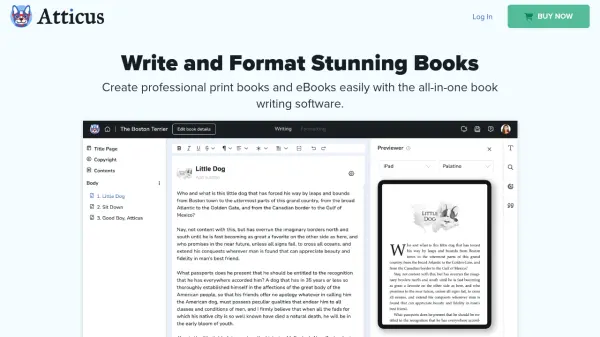
Atticus is a comprehensive book writing and formatting software designed specifically for authors. It provides an integrated environment where writers can compose their manuscripts and prepare them for publication with professional formatting tools. The platform offers customizable templates, theme builders, and device previews to ensure books look polished across various reading devices.
Built as a Progressive Web App, Atticus works seamlessly on Windows, Mac, Linux, and Chromebook devices, both online and offline. The software includes cloud storage and backups for data security, along with features like full bleed images, footnotes, callout boxes, and support for volumes and parts. Authors can import existing work, choose from multiple design options, and export to EPUB, PDF, and DOCX formats compatible with all major book markets.
Features
- Writing Editor: Built specifically for authors with intuitive writing environment
- Formatting Templates: 17+ templates with 1,200+ unique combinations for book design
- Multi-Platform Compatibility: Works on Windows, Mac, Linux, and Chromebook devices
- Device Preview: See how books appear on various e-readers and mobile devices before publishing
- Import/Export Options: Import DOCX files and export to EPUB, PDF, and DOCX formats
- Custom Theme Builder: Create unique book designs with personalized themes and fonts
- Cloud Storage: Automatic saving and cloud backups for data security
- Offline Functionality: Write and format without internet connection when needed
Use Cases
- Formatting fiction books for publication
- Preparing non-fiction manuscripts for print and digital distribution
- Converting existing manuscripts from other writing software
- Creating professional eBooks for online marketplaces
- Designing print-ready books for physical publishing
- Managing multiple books under different pen names
- Previewing book layouts across various reading devices
FAQs
-
What devices can I use Atticus on?
Atticus works on any device with a browser including Windows, Mac, Linux, Chromebook, tablets, and smartphones. -
How many books can I format with Atticus?
There are no limits to how many books you can format or how many pen names you can use. -
What file formats can I export my books to?
Atticus exports to EPUB, PDF, and DOCX formats that work with all major book markets and platforms. -
Do I need design experience to use Atticus?
No, basic computer skills are sufficient, and tutorials are available to guide you through the formatting process. -
What happens if I'm not satisfied with Atticus?
There's a 30-day money-back guarantee with no questions asked if you're not completely satisfied.