What is Allocate?
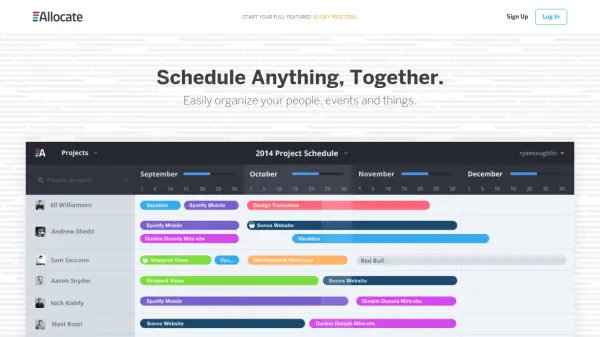
Allocate is a scheduling platform designed to help teams coordinate people, events, and resources with ease. It enables users to create project boards that provide instant visibility into team schedules and availability, making it simple to manage priorities and ensure proper coverage for events and projects.
The platform offers a full-featured 30-day free trial with no credit card required, allowing teams to experience all premium features before committing to a subscription. Allocate replaces traditional tools like spreadsheets, internal emails, and Google Calendar with a more organized and efficient solution for scheduling and resource planning.
Features
- Project Boards: Create multiple boards to organize schedules and resources for different projects or events
- Team Scheduling: Schedule up to 25, 50, or more people depending on the plan with visibility into who is working on what
- Resource Planning: Quickly see team availability and identify unbooked resources for better allocation
- Email Team Schedules: Automatically send team schedules via email to keep everyone informed
- Multiple Allocations: Assign team members to multiple projects or events simultaneously
Use Cases
- Project planning for engineering teams across multiple offices
- Resource planning for management teams to track work assignments
- Event coverage coordination for sales and marketing teams
- Team scheduling for small to medium-sized businesses
- Replacing spreadsheets and internal emails for scheduling tasks
FAQs
-
How does the 30-day trial period work?
During the free 30-day trial, you and your team enjoy all features of a Premium account without needing a credit card. After 30 days, you select a subscription plan and enter payment details to begin billing. If no paid plan is chosen, your account converts to the free plan with limited features. -
How will I be charged for my subscription?
After the trial, you select a plan and set up payment information. You are billed automatically every month for the chosen plan. You can cancel or change your plan anytime, with mid-month changes prorated. -
Do I have to sign a long-term contract?
No, Allocate is a month-to-month subscription service with no long-term contracts or hidden fees. You pay monthly after the trial and can cancel anytime. -
What happens when I use up all allotted resources on my plan?
When you reach the limit of maximum people or project boards, you and collaborators are prompted to upgrade. You cannot add more people or boards until upgrading, and your subscription level only changes if you explicitly make that change.