You ask an AI assistant to research a competitor, draft a blog outline, generate header images, and schedule a social post. One tool handles search. Another writes copy. A third renders images. A fourth connects to your CMS. The magic is not any single model call. It is the sequence: search before write, write before image prompt, image before publish. When step three fails, the whole workflow should not silently ship broken drafts.
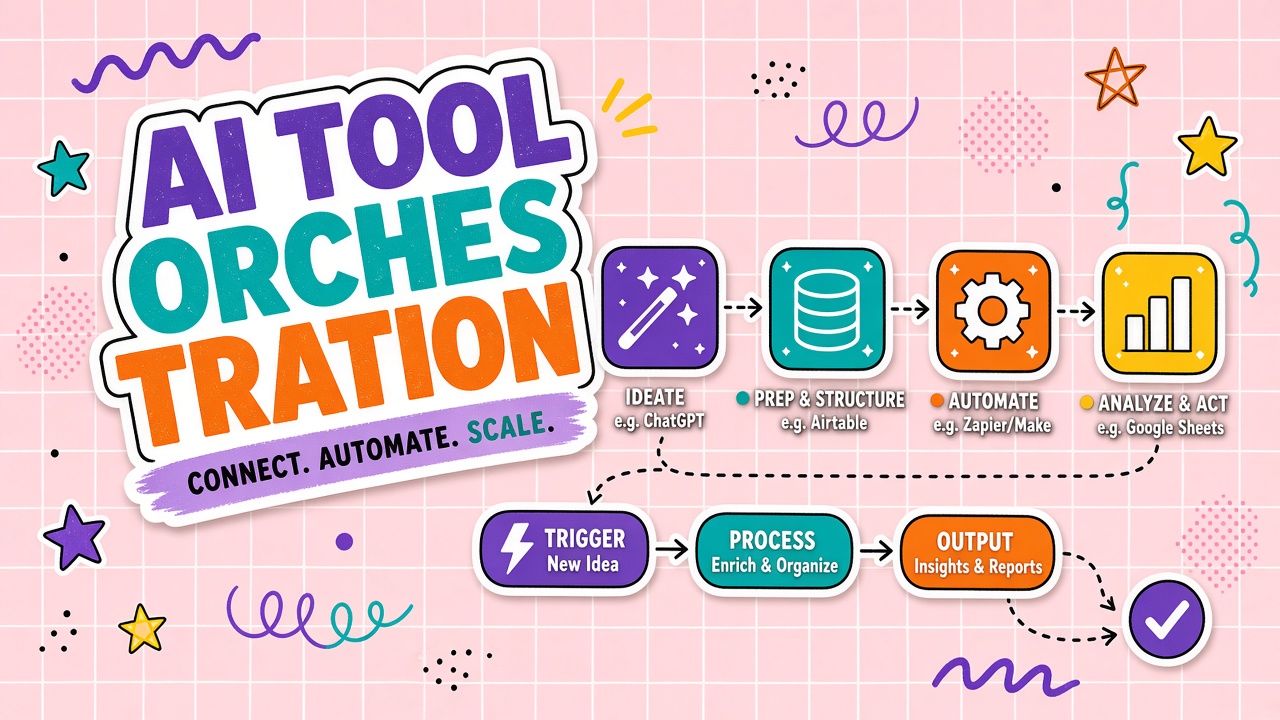
AI tool orchestration is the layer that chains multiple AI services, APIs, and automations into a coordinated workflow. An orchestrator plans which tool runs when, passes state between steps, handles errors, and exposes traces for debugging. Zapier, Make, n8n, LangGraph, CrewAI, Temporal, and vendor agent builders all implement variants of this pattern. Without orchestration, teams wire one-off scripts that break when a single API changes. With orchestration, multi-step AI products become maintainable systems. This guide covers orchestrator and worker roles, sequential versus parallel versus conditional flows, partial failure handling, observability, and when no-code stacks suffice versus custom code. Creators comparing AI design tools and AI writing tools should evaluate how well each product orchestrates steps beyond a single chat reply.
Orchestrator, Workers, and Shared State
Orchestration separates planning from execution. The orchestrator decides what happens next. Worker tools perform atomic tasks: call an LLM, search a database, render an image, send an email. Shared state carries inputs, outputs, and metadata across steps so each worker does not start from zero.
Core components
- Orchestrator: Often an LLM with tool-use capability, a rules engine, or a graph runtime. Reads state, selects the next action, and loops until a stop condition.
- Workers (tools): Discrete functions with defined inputs and outputs. Examples: web search, code execution, image generation API, CRM update.
- State store: JSON document, database row, or in-memory object holding conversation history, intermediate artifacts, user preferences, and error flags.
- Control flow: Logic that branches, retries, or terminates based on worker results and business rules.
State design matters early. A minimal state schema might include: original user goal, completed steps, pending steps, artifacts (draft text, image URLs, citation list), and error objects. Workers should read and write only the fields they own to avoid race conditions in parallel flows.
Sequential, Parallel, and Conditional Flows
Orchestration patterns mirror traditional workflow engines adapted for non-deterministic AI steps. Choose the pattern based on dependencies between tasks and tolerance for partial results.
| Pattern | When to use | Example |
|---|---|---|
| Sequential | Each step depends on the previous output | Research, then outline, then full draft, then edit pass |
| Parallel | Independent subtasks can run simultaneously | Generate three headline variants in parallel, then rank |
| Conditional | Next step depends on classification or validation | If draft contains claims, run fact-check tool before publish |
| Loop / agentic | Goal not achievable in fixed steps | Coder agent edits file, runs tests, repeats until tests pass |
Creative pipelines often blend patterns. A AI writing workflow might parallelize research across sources, sequentially merge findings into an outline, conditionally invoke a legal review tool, then call an AI design tool for hero images only after copy is approved.
Error Handling and Partial Failure
Multi-step AI workflows fail more often than single API calls. Models hallucinate tool arguments. External APIs rate limit. Image generators return empty results. Orchestration must define what happens when step N fails instead of abandoning steps 1 through N-1 without recovery.
Failure strategies that production systems use
- Retry with backoff: Transient network or rate-limit errors retry a bounded number of times before escalation.
- Fallback tool: If primary image model fails, route to a secondary provider or a stock image search.
- Degrade gracefully: Ship text without images, or return partial results with clear "step failed" flags to the user.
- Human-in-the-loop: Pause workflow, notify a reviewer, resume after approval or correction.
- Compensating actions: If publish step fails after draft was saved, roll back CMS draft or mark as unpublished.
Idempotency keys on external writes prevent duplicate posts when a retry succeeds twice. Store enough context in state to resume from the last successful step rather than restarting expensive LLM calls from scratch.
Validation gates between steps
Insert lightweight checks between AI steps: schema validation on JSON outputs, maximum length checks, banned phrase filters, or a smaller model that scores whether research citations exist. Gates catch bad outputs before they propagate into downstream tools that amplify errors.
Observability: Traces, Logs, and Replay
Debugging a one-shot chat is hard. Debugging a twelve-step orchestration without traces is impossible. Production orchestration requires structured logging of every step: inputs, outputs, latency, model ID, tool name, and parent trace ID.
What to capture per orchestration run
- Trace ID: Single identifier linking all steps in one user request.
- Step graph: Which steps ran, in what order, with parallel branches noted.
- Token and cost per step: Attribute spend to research versus generation versus image tools.
- State snapshots: Redacted copies of state before and after each worker (mind PII in logs).
- Error objects: Stack traces, API status codes, and retry counts.
Replay lets engineers re-run a failed workflow from a saved state without re-invoking paid APIs on successful early steps. Store immutable artifacts (research summaries, approved outlines) so replay tests fixes on step seven without regenerating step two. OpenTelemetry, LangSmith, and custom event buses are common integration points.
A Real-World Content Pipeline Example
Consider a marketing team producing a blog post with AI assistance. Step one: a research worker searches competitor articles and internal analytics. Step two: an outline worker structures H2 headings from research notes. Step three: a writing worker drafts sections sequentially, each conditioned on the approved outline. Step four: a conditional branch runs a compliance check if the topic touches regulated claims. Step five: a design worker generates hero images from approved title and summary. Step six: a publish worker pushes to CMS with metadata. State carries the outline, draft, image URLs, and approval flags between steps.
If the design worker fails, orchestration returns the approved draft with a retry button instead of losing research and writing work. If compliance rejects a section, only that section regenerates, not the entire pipeline. This pattern is how AI writing and AI design tools differentiate from single-prompt chat: explicit steps, recoverable state, and auditable traces.
Common Orchestration Approaches
Teams choose among no-code automation, low-code agent builders, and fully custom graph code. The right choice depends on engineering capacity, compliance requirements, and how often workflows change.
No-code and low-code automation
Zapier, Make, and n8n connect SaaS APIs with visual flows. Recent AI steps (OpenAI, Anthropic nodes) fit marketing and ops automations where steps are mostly linear. Limits appear on complex branching, stateful agent loops, and fine-grained observability. Good for prototypes and internal tools with moderate volume.
Agent frameworks and graph runtimes
LangGraph, CrewAI, AutoGen, and vendor agent SDKs model workflows as graphs with explicit nodes and edges. Better for cyclic agent behavior, custom retry logic, and programmatic testing. Requires developers comfortable with Python or TypeScript and CI pipelines for workflow changes.
Vendor agent builders
Microsoft Copilot Studio, Salesforce Agentforce, and similar products bundle orchestration with enterprise auth and audit trails. Trade flexibility for governance. Evaluate exportability if you may outgrow the builder.
Cost Control Across Orchestrated Steps
Multi-step pipelines multiply token spend. A research step, three drafting steps, an image generation call, and a final polish pass each bill separately. Set per-run budgets in the orchestrator: halt or skip optional steps when cumulative cost exceeds a threshold. Attribute spend per step in traces so product teams know which workflow stages dominate bills. Cost-aware orchestration is as important as error-aware orchestration for sustainable AI products.
Start with the smallest orchestration that solves the workflow. A five-step Zapier chain that ships in a week beats a custom LangGraph deployment that takes a quarter if both meet reliability needs. Scale orchestration complexity only when no-code limits on branching, secrets, or testing block production requirements.
Frequently Asked Questions
How is orchestration different from a single agent with tools?
A single agent with tools is a minimal orchestration pattern: one planner loops over tool calls until done. Full orchestration adds explicit workflow graphs, parallel execution, persistent state across sessions, human approval steps, and operational tooling (replay, cost attribution). Complex products usually outgrow implicit single-agent loops.
When is no-code orchestration enough?
No-code fits linear or lightly branching flows, low-to-medium volume, and teams without dedicated AI engineers. Move to custom code when you need agentic loops with hundreds of steps, strict latency SLAs, custom eval hooks, or workflows that change weekly under version control.
Should users see partial results when a step fails?
Usually yes, with clear labeling. Showing the completed research and draft while flagging "image generation failed" is better than a generic error. Let users retry failed steps or edit intermediate artifacts when possible.
What security risks does orchestration introduce?
Each tool is an attack surface: prompt injection via search results, over-privileged API keys, data leakage between tenants in shared state. Apply least-privilege credentials per worker, sanitize tool outputs before the next LLM step, and isolate tenant state in multi-user products.
How do you test multi-step AI workflows?
Mock external tools in unit tests. Run integration tests with recorded fixtures for LLM responses. Maintain golden traces from production failures as regression cases. Measure end-to-end success rate, not single-step accuracy alone.
Building Reliable Multi-Tool AI Products
AI tool orchestration turns isolated model calls into dependable workflows by managing planners, workers, state, and failure modes explicitly. Sequential, parallel, and conditional patterns map to real creative and operational pipelines. Invest in observability early: traces, replay, and per-step cost attribution separate demo chains from production systems. When evaluating AI design and AI writing platforms, ask whether they orchestrate end-to-end outcomes or stop at a single generated artifact.