Your product team wants to classify ten thousand support tickets overnight, summarize a backlog of research papers, or generate personalized email drafts for a campaign list. Running each request through a live chat endpoint one at a time would take hours, burn budget on peak pricing, and risk tripping rate limits before the job finishes. That is where AI batch processing enters the picture: a pattern where you submit many inference jobs as a single workload, often at a discount, and collect results when the provider finishes the queue.
Batch processing in AI tools is not the same as "batch size" in model training. In product and API terms, batch means deferred, bulk inference: you upload a file or JSONL of prompts, the platform schedules work asynchronously, and you poll or receive a webhook when outputs are ready. Streaming, by contrast, keeps a single request open and delivers tokens incrementally for interactive experiences. Teams building on AI API platforms and evaluating AI productivity suites need a clear decision framework for when to queue versus when to stream, because the wrong choice shows up as angry users, duplicate charges, or jobs that never complete.
What AI Batch Processing Is and How Batch APIs Work
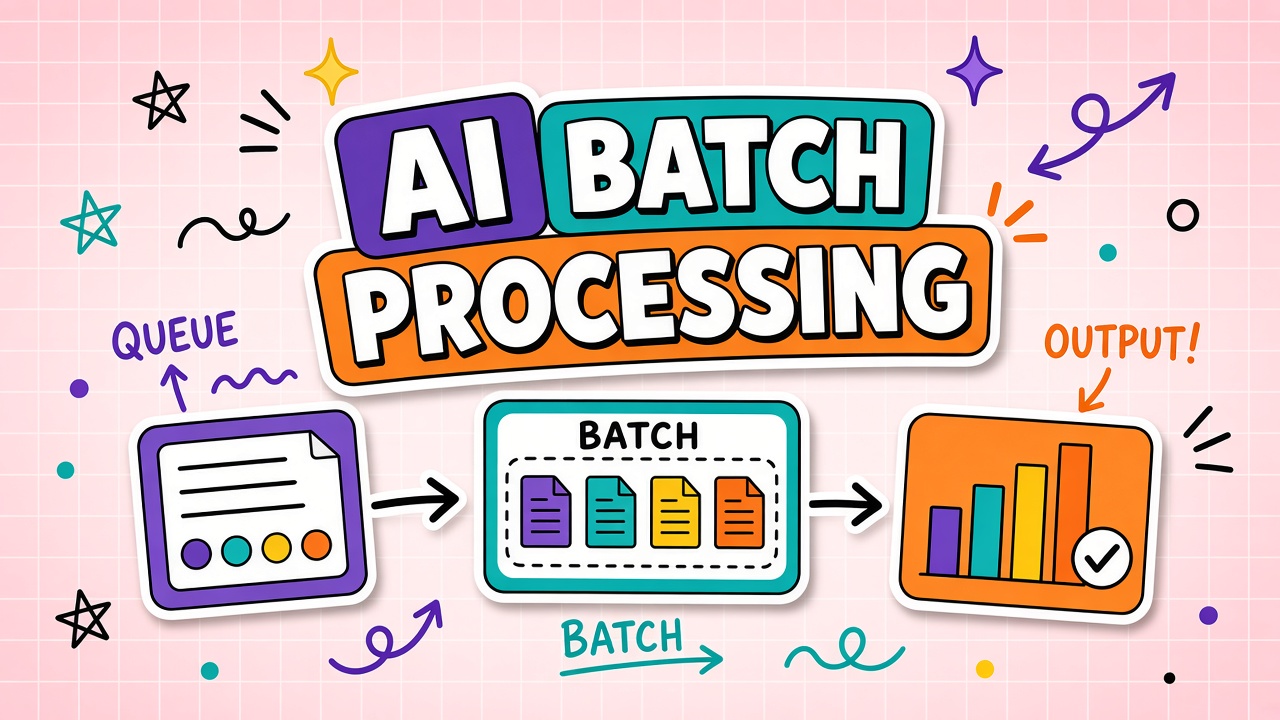
AI batch processing is asynchronous bulk inference. You define many independent prompts or structured inputs, submit them as one job, and retrieve results after the provider's workers finish. OpenAI, Anthropic, Google, and several inference hosts now offer batch or async endpoints alongside standard real-time APIs. The contract is consistent: lower cost per token or per request, higher latency, and explicit job states such as queued, in progress, completed, failed, or expired.
Typical batch API patterns follow a small set of steps. First, you prepare a input file where each line is a JSON object with a custom identifier, model name, and messages or parameters. Second, you create a batch job through the provider's API or dashboard, attaching that file and choosing an output destination. Third, you monitor status until completion or timeout. Fourth, you download an output file mapping each custom ID to the model response or error. Your application merges those results back into your database, CRM, or workflow engine using the custom IDs as join keys.
Batch endpoints versus real-time chat completions
Real-time endpoints optimize for time to first token and conversational turn-taking. Batch endpoints optimize for throughput and unit economics on work that does not need an answer in seconds. A coding copilot should stream. A nightly enrichment pipeline that tags product reviews should batch. Hybrid products often use both: stream for the UI and batch for backfill jobs that replay historical data through a new prompt template.
| Dimension | Batch processing | Streaming / real-time |
|---|---|---|
| Latency | Minutes to hours; SLA is a window, not milliseconds | Sub-second to a few seconds for first token |
| Cost | Often 50% or more below standard rates on major providers | Standard list pricing; peak concurrency may add infra cost |
| User experience | Background jobs, email when done, progress bars | Live typing indicators, cancel mid-generation |
| Failure handling | Per-line errors in output file; partial success is normal | Single request fails or succeeds as a unit |
Cost Savings and Latency Tradeoffs Buyers Should Model
The main economic argument for batch APIs is predictable spend on high-volume, delay-tolerant work. Providers discount batch because your traffic is easier to schedule across their GPU fleet. You trade immediacy for margin. A marketing team generating five hundred ad variants for human review can wait twenty minutes. A customer waiting in a live chat cannot.
Latency tradeoffs go beyond wall-clock time. Batch jobs introduce completion uncertainty: a provider may finish in ten minutes or two hours depending on queue depth. Product copy should never promise "instant" results for batch paths. Engineering should surface job status, estimated completion when available, and a clear path to retry failed lines without re-running the entire batch.
Hidden costs appear when teams batch work that still needs human review in sequence. Saving forty percent on inference but blocking a content team for a full day is a bad trade. Model the full workflow: queue time, download time, merge time, QA time, and rework rate when batch outputs drift from quality bars. Sometimes a smaller real-time sample validates a prompt before you batch ten thousand rows.
When to queue versus when to stream
- Queue (batch): ETL enrichment, document classification, offline translation, embedding generation for search indexes, A/B prompt evaluation on historical logs.
- Stream: Chatbots, copilots, collaborative editors, voice assistants, any UI where the user watches text appear.
- Hybrid: Stream the first answer for UX, then batch remaining pages of a PDF; or stream a summary while batch jobs extract structured fields from attachments.
Productivity tools that advertise "bulk actions" often wrap batch APIs behind a simple CSV upload. Verify whether the vendor passes batch savings to you or marks up standard pricing. For direct API integrations, compare batch price per million tokens against your average prompt and completion length multiplied by row count.
Idempotency, Deduping, and Safe Retries in Batch Pipelines
Batch jobs fail in pieces. A thousand-line file may return nine hundred successes and a hundred rate-limit or validation errors. Without idempotency, a naive retry resubmits the entire file and doubles spend on rows that already succeeded. Production pipelines treat each line as an independent unit of work with a stable external ID.
Idempotency means submitting the same logical request twice does not create duplicate side effects in your system. For inference-only batch jobs, the side effect is usually a database update or CRM field write. Store the provider's batch ID, each custom line ID, and a hash of inputs. On retry, skip lines that already have a stored output with matching input hash. If the provider reuses line IDs across batches, namespace IDs with your job version.
- Custom IDs: Use IDs you control (ticket_id, order_id) so output files join cleanly to source records.
- Input hashing: Detect silent prompt changes between retries; a new hash triggers re-inference even if the business ID is unchanged.
- Write-ahead logs: Mark rows as processing before upload so a crash mid-merge does not leave ambiguous state.
- Partial replay: Build retry files containing only failed custom IDs, not the full original upload.
Idempotency also matters when batch outputs trigger downstream actions: sending email, updating billing, or creating support tickets. Never wire those actions directly to batch completion without checking whether that row was already processed in a prior attempt.
Rate Limits, Retries, and Operational Playbooks
Batch endpoints have their own rate limits: maximum files per day, maximum tokens per batch, concurrent batch jobs, and expiration windows if results are not downloaded. Real-time rate limits still apply when you mistakenly hammer the standard API while a batch is running. Operations teams should document both layers in runbooks.
Retry strategy should be tiered. Transient errors (HTTP 429, 503, timeout) deserve exponential backoff with jitter at the line or mini-batch level. Permanent errors (invalid model name, context length exceeded) should fail fast and surface to owners with the offending input snippet redacted. Provider batch docs often specify a completion window; after expiry, unclaimed results may be deleted and you pay again to regenerate.
| Error type | Typical cause | Recommended action |
|---|---|---|
| 429 / rate limited | Too many concurrent batches or account quota | Backoff, split into smaller batches, request quota increase |
| Context length | Single line exceeds model window | Chunk input, summarize first, or route to long-context model |
| Invalid JSONL | Schema drift in generator | Validate file locally before upload; block deploy on schema tests |
| Expired batch | Results not fetched within provider window | Automate polling; alert if job stuck in processing |
What to Ask Vendors About Batch and Queue Features
SaaS products may hide whether they use batch APIs internally or simply throttle your clicks. Procurement should ask for architecture-level answers, not only marketing claims about "unlimited bulk."
- Is bulk processing routed through the provider's official batch endpoint or a custom worker pool?
- What is the advertised completion window, and what happens to partial results on failure?
- Can you export failed rows with error codes for automated retry?
- Are batch discounts reflected in your invoice or absorbed by the vendor?
- Does the product support webhook notification on job completion, or only manual refresh?
- How are PII and retention handled for uploaded batch files on the vendor's storage?
Frequently Asked Questions
Is batch processing just parallel real-time API calls?
No. Parallel real-time calls still pay standard rates and compete for the same RPM and TPM limits. Official batch APIs use separate queues and pricing tiers. DIY parallelism without batch endpoints often hits 429 errors and costs more at scale.
Do batch jobs ignore rate limits?
Batch jobs have their own limits. They are usually more generous for throughput but less flexible for burst interactive traffic. You still need monitoring and retry logic when account quotas or regional capacity constrain the queue.
Should we retry the whole batch when some lines fail?
Almost never. Retry only failed lines with idempotency checks so successful rows are not re-inferred or double-written to your database. Full-batch retry is a common source of budget overruns.
Can we stream for demos and batch the same prompt in production?
Yes, but keep prompt versions in sync. A template tuned for streaming UX may need different system instructions when outputs are consumed by machines instead of humans. Version prompts explicitly in both paths.
Are batch upload files a security risk?
They can be. Files often sit in cloud storage until processed. Encrypt sensitive columns before upload when possible, use short retention policies, and restrict download permissions on output buckets. Treat batch files like any other data export containing customer content.
Choosing Queue or Stream for Your AI Workload
AI batch processing is the right default for high-volume, delay-tolerant inference where cost and stability matter more than seconds of latency. Streaming remains essential wherever humans wait on the answer. Mature teams implement both paths with shared prompt versioning, per-line idempotency, and operational alerts on stuck jobs.
When evaluating API-first platforms or productivity tools with bulk features, ask how batch maps to your SLAs, how failures surface, and whether retries are safe without duplicate spend. The teams that win at scale treat batch jobs like any other data pipeline: observable, resumable, and honest about tradeoffs with users.