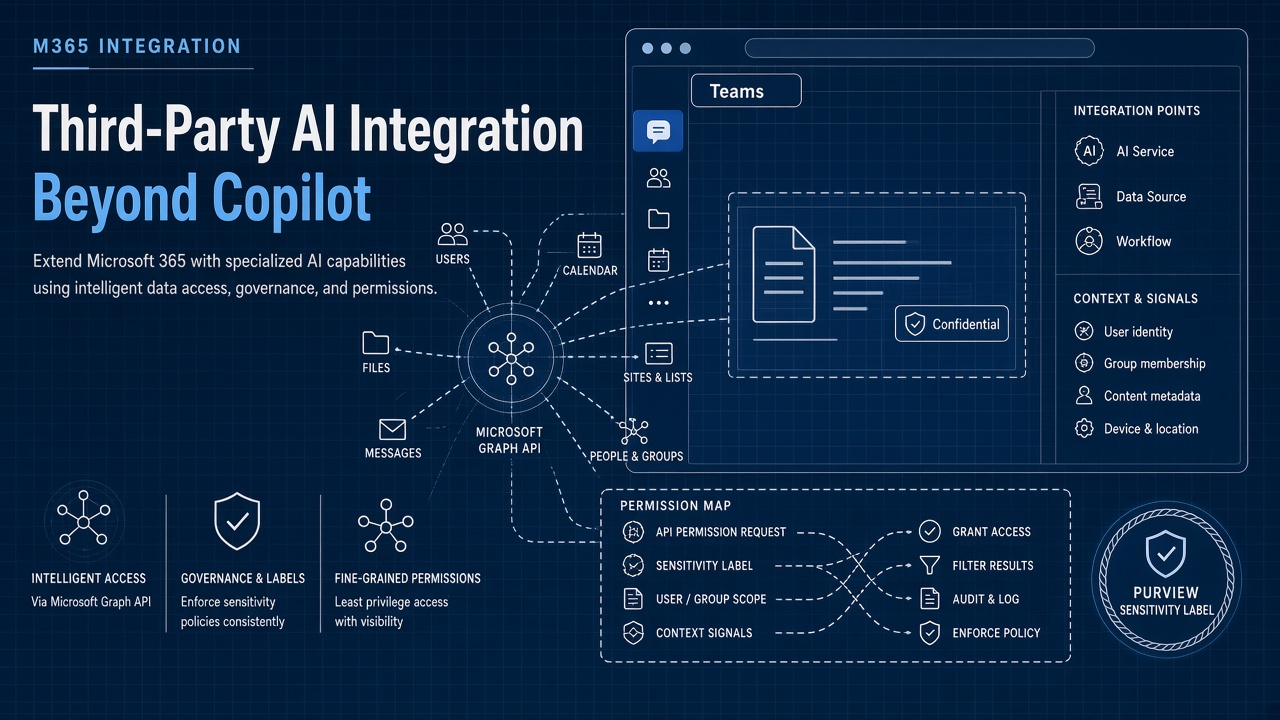
Microsoft 365 tenants increasingly run Microsoft Copilot alongside third-party coding assistants, document copilots, and Teams bots. Each integration requests Microsoft Graph permissions, reads SharePoint libraries, and processes content that Purview sensitivity labels were designed to protect.
Integrating AI tools with the Microsoft 365 Copilot ecosystem means minimizing Graph API permissions, hosting Teams apps responsibly, aligning with Purview labels, and enforcing conditional access. This guide helps identity, security, and platform teams deploy AI code assistant tools and other AI coding and productivity extensions without bypassing M365 governance.
Copilot Ecosystem Boundaries
Microsoft Copilot, Copilot Studio agents, and third-party Graph apps share tenant data but follow different admin consoles and consent models. Architecture diagrams should show every path from user prompt to model inference, including whether data stays in the Microsoft trust boundary or crosses to external SaaS.
- Native Copilot: licensed per user; governed by Microsoft data protection terms.
- Copilot Studio: custom agents with connector access; review connector scopes.
- Third-party Teams apps: separate publisher, hosting, and token storage.
- Graph API integrations: explicit application and delegated permissions.
Graph API Permission Minimization
Request the smallest set of Microsoft Graph permissions that support the AI feature; prefer delegated permissions tied to signed-in users over application permissions that read entire tenants. Application permissions with Mail.Read or Files.Read.All are frequent audit findings.
- Map each AI feature to required Graph endpoints and document alternatives.
- Use incremental consent so users approve sensitive scopes at feature activation.
- Review enterprise app registrations in Entra ID monthly for stale permissions.
- Require admin consent for application permissions in production tenants.
- Log Graph call volume per app to detect credential compromise or scope abuse.
| Permission | Common AI use | Minimization tactic |
|---|---|---|
| Files.Read.Selected | User-picked document Q&A | Prefer over Files.Read.All |
| ChannelMessage.Read.All | Teams thread summarization | Limit to bot-installed channels |
| Mail.Read | Inbox drafting assistants | Delegated only; no app-wide mailbox |
| User.Read | Profile and SSO mapping | Baseline; avoid bundling excess scopes |
Code Assistant Graph Touchpoints
An AI code assistant integrated with Azure DevOps or GitHub may still request Graph for identity; keep that surface separate from SharePoint document access unless the product truly needs both. Developers often approve broad consent screens to move faster; Entra admin consent policies block risky combinations.
Teams App Manifest and Hosting
Teams AI apps declare bot endpoints, static tabs, and message extensions in the manifest; hosting on vendor infrastructure sends Teams context and message content outside Microsoft unless you self-host. Review manifest permissions, valid domains, and whether the bot uses resource-specific consent for channels.
- Host backend in tenant-approved regions when contracts require data residency.
- Pin manifest versions in change control; unexpected updates can widen scopes.
- Use Teams admin center policies to allowlist approved AI app IDs.
- Test guest and external user access paths before broad rollout.
Message Extension vs Bot
Message extensions invoke AI on user-selected content; always-on bots may read channel traffic where installed. Choose interaction patterns that match data classification. High-sensitivity teams should use personal scope apps with explicit invoke actions rather than channel listeners.
Purview Sensitivity Labels
Microsoft Purview sensitivity labels encrypt and restrict actions on classified documents; third-party AI must respect labels or risk exporting content that users cannot open manually. Test whether AI tools block labeled files, pass label metadata to logs, or incorrectly upload encrypted blobs to external models.
- Inventory label taxonomy: Public, Internal, Confidential, Highly Confidential.
- Define which labels may enter external LLM processing (often none for top tiers).
- Align DLP policies to block paste of labeled content into unapproved AI URLs.
- Verify Copilot and third-party tools honor the same policy set or document gaps.
- Train users that labels are enforcement, not decoration.
| Label tier | Typical AI policy | Enforcement |
|---|---|---|
| Public / General | Approved internal Copilot features | Monitor for external sharing |
| Confidential | Microsoft-bound Copilot only | Block third-party upload connectors |
| Highly Confidential | No generative AI processing | DLP block plus encryption |
Conditional Access for AI Apps
Apply Entra conditional access policies to enterprise AI applications: require compliant device, trusted location, and MFA for sessions that can read mail or files. Treat high-scope AI apps like tier-one SaaS in your access package catalog.
- Separate policies for admin consent apps versus user-consented tools.
- Block legacy authentication paths to Graph tokens.
- Use session controls to limit download where vendors support it.
- Review sign-in logs for impossible travel on AI app service principals.
AI Coding Tools in Developer Tenants
Developer-focused AI coding extensions may request repository access beyond Graph; unify governance so one team owns risk assessment. Copilot for Microsoft 365 and GitHub Copilot fall under different admin experiences; document both in the same internal acceptable use policy.
SharePoint and OneDrive Libraries
AI retrieval over SharePoint libraries inherits site permissions; misconfigured sites leak content across departments when RAG indexes entire hubs. Scope connectors to specific libraries, use search filters, and re-index after permission recertification.
Copilot Studio Connectors
Copilot Studio agents that call SharePoint connectors multiply Graph traffic; throttle and monitor connector auth separately from user Copilot licenses. Custom agents need the same Purview review as third-party apps when they read labeled documents.
Governance Operating Model
Assign owners for Entra app registrations, Teams app approvals, Purview policy changes, and vendor DPAs. Quarterly reviews reconcile licensed Copilot seats with active third-party AI apps to find redundant data paths.
Exchange and Outlook Integrations
Outlook add-ins and Graph mail integrations process message bodies, attachments, and calendar invites. Apply the same Purview and DLP rules as SharePoint. Test behavior on encrypted messages and delegated mailbox scenarios where assistants might read executive inboxes.
Power Platform Overlap
Power Automate flows that call OpenAI connectors create parallel AI data paths outside Copilot admin reports. Inventory flows during AI governance reviews. Citizen developers may connect SharePoint libraries to external models without platform team awareness.
Viva and Employee Experience Apps
Microsoft Viva modules surface insights from workplace data; third-party AI apps in Teams may duplicate engagement summaries with different retention rules. Document which system is authoritative for HR-sensitive analytics. Employees confuse vendor boundaries when multiple bots answer policy questions.
Entra Permission Reviews
Enable Entra access reviews for enterprise applications with Graph application permissions. Owners must justify continued access or admins revoke grants. AI apps accumulate stale permissions quickly when pilots end but app registrations remain active.
Defender and Cloud App Security
Microsoft Defender for Cloud Apps can monitor OAuth app activity and flag anomalous Graph downloads. Connect discovery reports to your AI app inventory. Policies that mark unsanctioned AI tools help security teams coach users toward approved alternatives instead of silent blocks without explanation.
Frequently Asked Questions
Can we use third-party AI apps in GCC High tenants?
GCC High restricts many marketplace apps and external endpoints; verify FedRAMP alignment and Microsoft publishing status before procurement. Custom Teams apps may need dedicated hosting in authorized regions. Plan longer security reviews than commercial tenants.
How should we connect AI to SharePoint document libraries?
Use site-scoped permissions, library-level indexes, and label-aware filters rather than tenant-wide search connectors. Libraries with legal hold or records management need explicit exclusion lists. Test retrieval with a user who should not see cross-site content to validate isolation.
Does Microsoft Copilot replace third-party Graph AI apps?
Copilot covers many summarization and drafting scenarios but not specialized coding, design, or vertical workflows third parties provide. Architecture should define coexistence: which tasks stay in Copilot, which require approved externals, and which remain human-only.
How fast can we revoke a compromised AI app?
Disable the enterprise app in Entra, remove Teams app from catalog, and rotate client secrets in parallel. Maintain runbooks with contact trees for vendor security incidents. Graph audit logs help scope what data the app accessed before revocation.
Graph Discipline, Purview Alignment
Microsoft 365 AI integrations succeed when Graph permissions stay minimal, Teams apps are hosted and allowlisted deliberately, Purview labels govern what may be processed, and conditional access protects high-risk sessions. Copilot and third-party tools coexist only with clear boundaries.