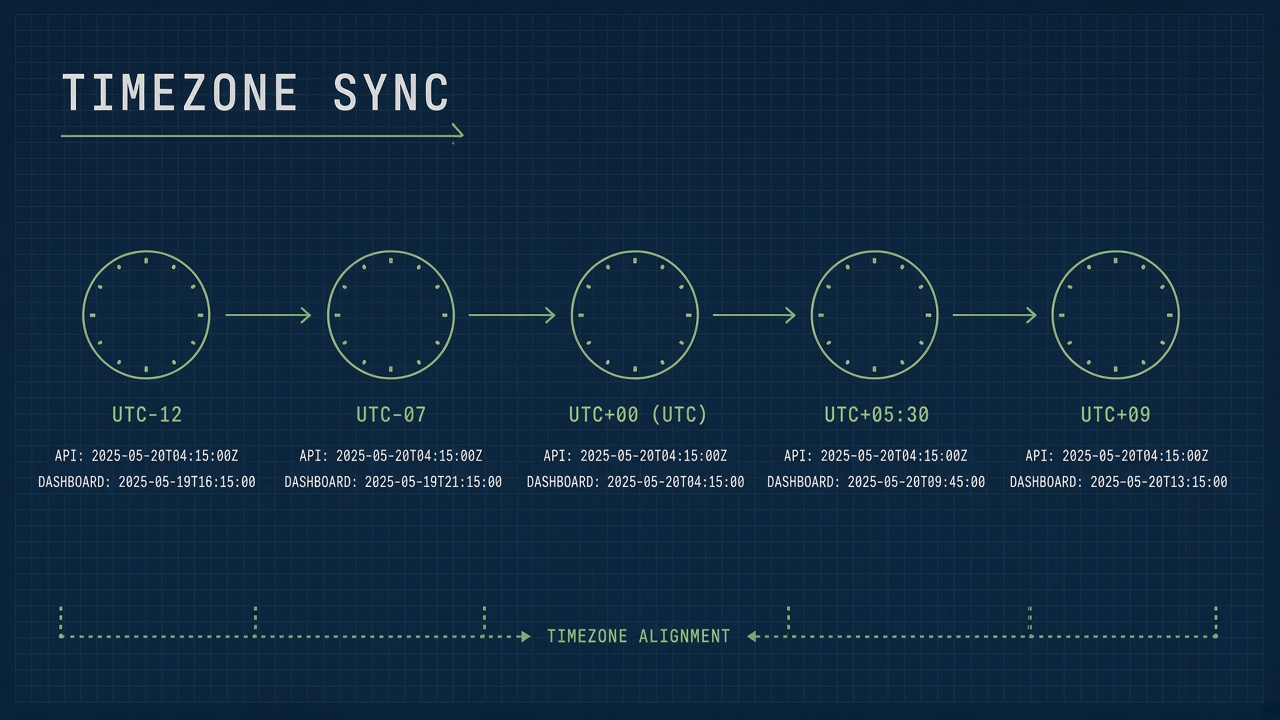
Usage logs show events at midnight when your team was at lunch. Billing exports disagree with the vendor dashboard by eight hours. Audit trails fail compliance review because timestamps cannot be reconciled across systems. When AI tool wrong timezone symptoms appear, the root cause is almost never the model. The API, dashboard, export pipeline, and SIEM each interpret time differently.
This guide walks through verifying UTC versus local returns, fixing dashboard preference bugs, labeling CSV exports, and normalizing events for security analytics. Teams running AI productivity workflows and private AI chatbot deployments share the same failure modes when logs cross regions and daylight saving boundaries.
Verify API Returns UTC vs Local
Most AI vendor APIs store and return timestamps in UTC (ISO 8601 with Z suffix or explicit +00:00 offset). Your application must treat API values as UTC at ingestion, convert once for display, and never double-convert. The first debug step is a single known event: trigger one API call, capture the raw JSON timestamp, and compare to vendor documentation for that field.
| Signal | Likely meaning | Action |
|---|---|---|
Suffix Z or +00:00 |
UTC instant | Parse as UTC; convert at UI boundary only |
| No timezone in string | Ambiguous local or naive datetime | Confirm vendor docs; never assume your server TZ |
| Unix epoch integer | UTC instant (seconds or milliseconds) | Check unit; ms vs s off by 1000x looks like wrong year |
Offset like -05:00 |
Explicit offset at event time | Store UTC internally; preserve original for audit if required |
Run curl against the usage or audit endpoint and log the raw response body before any ORM or JSON parser applies locale defaults. Compare the same request ID in the vendor admin console. If console shows local time but API returns UTC, your integration is correct and the bug lives in how your app renders. If both disagree with wall clock at event time, open a vendor ticket with request ID and captured payload.
For
ai log timezone issue
reports, document which layer owns canonical time: vendor API, your database column type (timestamptz vs
timestamp), application server default zone, and browser locale. A chain of three implicit assumptions produces the classic
"off by exactly N hours" pattern where N matches a fixed offset, not random drift.
- Capture one event with known wall-clock time and request ID.
- Record raw API field value and documented timezone semantics.
- Record value after your ingestion job writes to database.
- Record value shown in internal admin UI and customer dashboard.
- Identify the first layer where offset appears; fix there only.
Dashboard User Preference Bugs
Vendor dashboards often convert UTC to the logged-in user profile timezone, while your embedded iframe or API-backed UI may not. Support tickets claiming "the AI tool is logging wrong times" frequently compare two views using different rules. Align expectations by showing timezone abbreviation next to every datetime in product UI.
Common dashboard bugs include: profile timezone saved as string without IANA name (EST instead of
America/New_York), browser locale overriding saved preference on each session, team accounts where each member sees
different times for the same org-level audit log, and cached API responses keyed without timezone version so stale local conversion
persists after user updates preference.
Fix path: store user timezone as IANA identifier in profile; apply conversion in presentation layer with a single library
(Temporal, Luxon, or Intl.DateTimeFormat with explicit timeZone option). Never rely on PHP
date_default_timezone_set matching Node or Python workers in the same pipeline. For org-wide audit views, default to UTC
with optional local toggle rather than per-user silent conversion on compliance exports.
When debugging utc vs local ai dashboard mismatches, have two engineers in different regions open the same log entry simultaneously. If timestamps differ by their offset gap, the dashboard applies viewer locale correctly but your webhook or warehouse stored naive local. If all viewers see the same wrong value, storage or API parsing is wrong before display.
Export CSV Timezone Columns
CSV exports must include explicit timezone columns or ISO 8601 offsets, not ambiguous local strings. Finance and security teams merge AI usage CSVs with cloud billing and identity logs. Unlabeled datetimes force guesswork and break joins on minute boundaries around month-end.
Recommended export schema: event_at_utc (ISO 8601 UTC), event_at_local (optional, with
timezone_id column), request_id, user_id, model, token_count.
Never export only 2026-09-13 14:30:00 without zone. Excel and Google Sheets will reinterpret naive strings using the
opener's locale, silently shifting rows when finance opens the file in London versus Chicago.
| Column pattern | Risk | Better approach |
|---|---|---|
| Single datetime, no zone | Spreadsheet locale reinterpretation | UTC ISO column plus optional local column |
| Split date and time columns | Midnight boundary errors on sort | One instant column in UTC |
| Epoch in seconds in one region, ms in another | Merged exports corrupt 1970 dates | Normalize to ISO UTC at export job |
Scheduled exports from
productivity
suites should run in UTC cron regardless of company HQ location. Document in export README that all times are UTC unless
timezone_id column is present. For
fix timestamp ai export
workflows, replay last month export through validation script that asserts every row parses as UTC and sorts monotonically per request ID.
SIEM Ingestion Normalization
Send AI audit events to your SIEM as UTC JSON with stable field names before any detection rule runs.
Splunk, Elastic, Sentinel, and Datadog each map timestamps to @timestamp or equivalent. If your log shipper parses naive
strings as local server time, detections fire at wrong hours and cross-correlation with Okta or AWS CloudTrail fails.
Normalization checklist: use RFC 3339 in JSON logs; set shipper timezone to UTC on collection agents; map vendor webhook timestamps
through one normalization function shared by API ingestion and batch export; include original_timezone field only when
vendor sends non-UTC and you must preserve evidence; tag AI events with source=ai_vendor_name and event_type
for join keys.
Detection rules should reference UTC windows ("more than 1000 tokens between 02:00 and 02:05 UTC") and document that analyst dashboards may display local time as a view transform. During incidents, on-call engineers compare SIEM timeline to vendor status page in UTC to avoid debating whether an outage "really" started at 9 PM or 2 AM.
Multi-product stacks often duplicate the same chat event into application logs, vendor audit API, and webhook delivery logs with three different timestamp formats. Pick one canonical stream for compliance retention and align others in ETL. Discrepancies under one second are clock skew; discrepancies of exact hour multiples are timezone bugs.
Implementation Checklist
- Document vendor timestamp format in internal runbook with example payload.
- Store all instants in database as UTC (
timestamptzon PostgreSQL). - Convert to local only in UI with explicit IANA zone from user profile.
- Label every displayed datetime with zone abbreviation or "UTC".
- Export CSV with
event_at_utcISO column and optionaltimezone_id. - Normalize webhook and batch logs before SIEM with shared parser.
- Add unit tests for DST transition dates in primary user regions.
Common Mistakes to Avoid
- Calling
new Date(string)in JavaScript on naive datetime strings without zone. - Setting server timezone to US Eastern "because most users are there" while API returns UTC.
- Double conversion: UTC to local in API middleware, then local to UTC in report job.
- Using
CURRENT_TIMESTAMPwithout timezone in SQL while comparing to API UTC strings. - Hiding timezone in UI to reduce clutter; support volume increases when users cannot self-verify.
Frequently Asked Questions
Why do timestamps break twice a year in US regions?
Daylight saving transitions create ambiguous local times (fall back hour repeats) and skipped times (spring forward). Fixed offsets like
UTC-5 do not follow DST. Always store UTC and convert with IANA zones (America/Chicago). Run automated tests
on second Sunday in March and first Sunday in November for critical export jobs.
How should multi-region teams view the same audit log?
Default org audit UI to UTC with clear header label. Offer per-user toggle to local IANA zone. Compliance PDFs should state "All times UTC" in footer. For private chatbot deployments in EU and US, separate data residency does not remove need for UTC canonical storage in each region's replica.
Vendor console shows correct time but our warehouse is wrong. Where is the bug?
Usually your ETL treated API UTC as local when loading, or truncated timezone from ISO string. Re-ingest one day with fixed parser and compare row counts and checksum. Console is rarely wrong; transformation pipeline is the usual fault.
Can wrong timestamps affect AI billing reconciliation?
Yes. Usage billed by calendar month in vendor timezone may not match your finance month in HQ timezone. Align on UTC month boundaries for internal reporting or pull vendor invoice line items as source of truth and map request IDs back to your logs in UTC.
The Bottom Line
Wrong timezone timestamps in AI tool logs trace to ambiguous storage, double conversion, or unlabeled exports, not model behavior. Verify API semantics once, store UTC everywhere durable, convert at display with explicit IANA zones, and normalize before SIEM. Teams shipping AI productivity features should treat timezone labeling as part of audit readiness, not a polish task after launch.