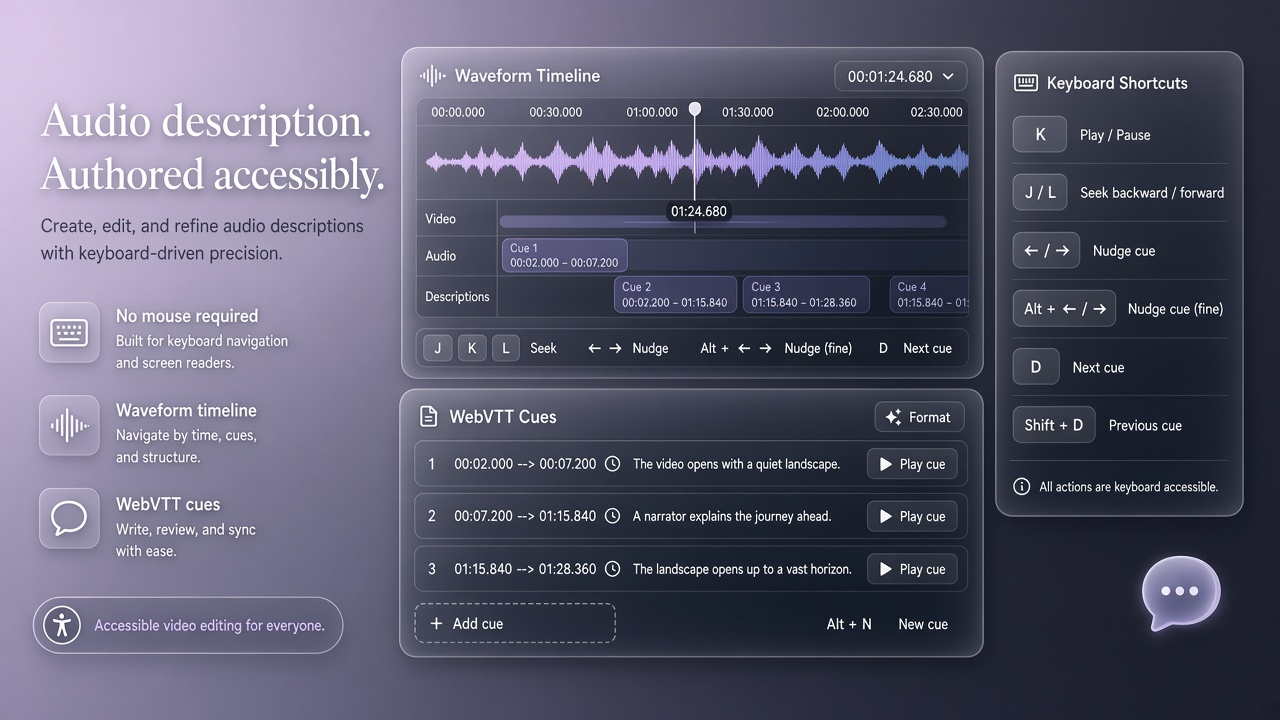
Audio description (AD) makes visual media accessible by narrating actions, settings, and on-screen text between dialogue gaps. Blind and low-vision (BLV) creators who produce video content historically relied on sighted collaborators to draft descriptions, scrub timelines, and check synchronization. ADCanvas, presented at CHI 2026 (arXiv:2602.07266), reframes BLV users as curators rather than passive consumers: a conversational AI agent built on Gemini 2.5 multimodal capabilities proposes description drafts while a screen-reader-friendly WebVTT editor, keyboard-driven playback, and visual question answering (VQA) loops let creators verify accuracy independently. Researchers studied twelve BLV video creators across genres. Participants authored and refined descriptions with substantially less sighted assistance than baseline tools allowed. Teams evaluating AI image generator adjacent accessibility stacks or popular AI tools for media production should understand how ADCanvas balances generative speed with curator control before deploying generic captioning bots in professional workflows.
Why Blind Creators Need Authoring Tools
Most accessibility tooling assumes BLV people consume media others produce; creator-side tooling lags, forcing dependence on sighted assistants for timeline inspection and visual fact-checking. YouTube, TikTok, and educational channels increasingly expect creator-supplied AD tracks for compliance and audience growth. Generic auto-description services output vague or misordered narration that creators cannot efficiently correct without accessible waveform and frame inspection. ADCanvas targets the asymmetry: BLV creators understand audience needs and narrative intent but lack non-visual pathways to validate what the camera shows at each timestamp.
Prior research focused on player-side AD consumption or sighted professional describers in broadcast studios. Independent BLV creators operate with tighter budgets, irregular publishing schedules, and mixed media types including gaming captures, interviews, and tutorials. Tools must integrate with existing screen readers, avoid mouse-only canvas interactions, and expose structured text formats studios already accept. WebVTT support positions ADCanvas within standard streaming pipelines rather than proprietary silos.
Gemini Multimodal Agent and VQA Loops
ADCanvas sends video segments to a Gemini 2.5 multimodal large language model that proposes concise description candidates aligned with dialogue gaps, then subjects each candidate to creator-driven verification through VQA prompts. The agent does not unilaterally publish narration. Creators ask targeted questions such as whether a character holds a red folder or whether on-screen text matches a spoken name. The model answers from visual evidence; creators accept, edit, or reject lines in the WebVTT transcript. This curator pattern reduces hallucinated objects common in one-shot auto-description while preserving AI speed for first drafts.
| Component | Accessibility feature | Curator control |
|---|---|---|
| Conversational agent | Screen-reader announced chat turns | Creator approves each draft segment |
| WebVTT editor | Structured cues with keyboard focus order | Manual text edits override model output |
| Keyboard playback | Frame-step without pointer devices | Precise gap timing for AD insertion |
| VQA verification | Natural language visual queries | Reject hallucinations before export |
WebVTT Editing and Keyboard Playback
The WebVTT editor exposes cue start times, end times, and description text as navigable fields compatible with NVDA, VoiceOver, and JAWS focus models, while keyboard playback maps transport commands to standard shortcuts. Creators step frame by frame or jump between cues to ensure descriptions fit pauses without overlapping dialogue. The CHI study reported that keyboard-first navigation eliminated a primary barrier: prior tools required dragging handles on visual timelines. Export produces standards-compliant files for YouTube, Vimeo, and HTML5 players, reducing post-production friction for independent channels.
Timing precision matters for adcanvas audio description ai workflows because overlapping narration degrades comprehension for blind audiences. ADCanvas highlights cue duration warnings when text exceeds available gaps, prompting creators to shorten prose or split cues. Screen reader announcements distinguish model-suggested cues from creator-locked cues, preserving mental models during long editing sessions across multi-hour source videos.
Study Findings With Twelve BLV Creators
Twelve BLV creators with prior video experience completed authoring tasks on their own content and standardized clips, demonstrating independent draft generation, verification, and export without continuous sighted mediation. Participants valued curator status: AI accelerated first drafts but did not replace judgment about what deserved description versus what dialogue already conveyed. Gaming creators emphasized VQA for fast action sequences; educators prioritized on-screen text and diagram narration. Friction remained around extremely dense visual montages where gap timing was sub-second; future work may integrate audio scene detection to suggest gap candidates automatically.
Compared to baseline tools that offered either manual typing without visual grounding or fully automated descriptions without edit accessibility, ADCanvas reduced time-to-first-usable track while increasing creator confidence scores in post-study surveys. Several participants noted ethical responsibility to describe diversity cues such as race and disability visibly portrayed, areas where generic models under-describe or stereotype. Human curation remains essential for inclusive AD even when multimodal models improve.
Implications for Platforms and Policy
Streaming platforms that mandate accessibility should supply creator-side AD tooling, not only player-side toggles, and should avoid positioning BLV users solely as end consumers of sighted-produced description. ADCanvas illustrates that multimodal LLMs belong in verification loops with structured editors, not as black-box publishers. Procurement teams comparing auto-AD vendors should ask whether blind creators can independently validate output, export WebVTT, and control timing with keyboards. Regulatory frameworks referencing WCAG media alternatives gain enforceability when authoring tools meet the same accessibility standards as playback.
Model upgrades from Gemini 2.5 successors will require revalidation of VQA accuracy on fast motion, animation, and multilingual on-screen text. Open interfaces letting creators swap backend models while retaining the WebVTT shell would future-proof investments. Research artifacts from the CHI paper should be monitored for public release builds; until then, design teams can replicate curator-agent separation using existing APIs with the same accessibility guardrails.
Comparing ADCanvas to Auto-Description Services
Consumer auto-description APIs optimize for speed and sighted reviewer correction, whereas ADCanvas optimizes for blind curator authority over every cue. Generic services output continuous narration that overlaps dialogue because they lack accessible gap editors. Sighted creators can drag timeline handles to fix timing; blind creators cannot. ADCanvas inverts the workflow: timing is keyboard-native from the start, and VQA verifies content before cues lock. The CHI 2026 study positioned this difference as occupational justice for BLV YouTubers who should not pay sighted contractors for tasks the platform could support directly.
Broadcast-quality description guidelines from networks such as Netflix and BBC specify objectivity, present-tense verbs, and avoidance of interpretive commentary unless genre requires it. Gemini 2.5 drafts sometimes over-narrate emotion; curators edited lines to match style guides during the twelve-participant evaluation. Template prompts embedded in ADCanvas nudge the agent toward standard AD register while leaving final wording to humans. Platforms integrating similar agents should expose style presets rather than one-size-fits-all narration.
Workflow From Import to Published AD Track
A typical ADCanvas session imports source video, segments chapters for agent processing, generates draft cues per gap, runs VQA on disputed frames, adjusts timing with keyboard playback, and exports WebVTT for platform upload. Long videos batch into scenes to respect model context limits. Creators bookmark critical frames with keyboard shortcuts, attaching questions the VQA module answers before cues finalize. Screen readers announce batch progress so users can multitask during generation. Error recovery preserves WebVTT state if API calls fail, preventing loss of curator edits when connectivity drops mid-session.
Collaboration affordances let trusted sighted reviewers comment on exported WebVTT without becoming mandatory gatekeepers. BLV creators share read-only preview links with optional audio-rendered description tracks for quality assurance. The adcanvas audio description ai architecture treats collaboration as optional acceleration, not dependency. Training materials for blind creator communities should demonstrate VQA questioning patterns that catch common multimodal errors, such as misidentified colors or left-right reversals in mirrored footage.
Frequently Asked Questions
What is ADCanvas?
ADCanvas is a research system for blind and low-vision video creators to author audio description using a Gemini 2.5 multimodal agent, WebVTT editor, keyboard playback, and VQA verification. It was presented at CHI 2026 (arXiv:2602.07266).
Does the AI write descriptions alone?
No. The AI proposes drafts; creators curate, verify visually through VQA, edit text, and set timing before export. The study framed BLV users as curators, not passive consumers.
Which screen readers work?
The study designed for mainstream screen readers including NVDA, VoiceOver, and JAWS with standard focus navigation through WebVTT fields and transport controls.
Can I export to YouTube?
WebVTT export aligns with common streaming workflows. Creators upload description tracks according to each platform's AD or caption ingestion process.
How does VQA help blind creators?
Creators ask natural language questions about specific frames or segments. The multimodal model answers from video evidence, supporting fact-checking without sighted assistants.
Is ADCanvas publicly available?
Check the CHI 2026 paper and authors for release status. The architecture guides accessible AD tooling design even before a public download exists.
Broadcasters contracting description services should study ADCanvas curator patterns when scoping AI assistance: professional describers may use similar VQA loops to speed first drafts while retaining human nuance for dramatic tone. Indie creators gain the most immediate leverage because ADCanvas targets self-service publishing pipelines where budgets cannot fund studio describers per video.
Gemini 2.5 multimodal latency and quota limits will shape session design for long-form editing. Chunked segment processing with persistent WebVTT state avoids resending entire films to the model each edit. Engineering teams porting the concept should benchmark token costs against creator time saved, not only word counts generated.
Disability justice advocates rightly scrutinize whether AI description homogenizes aesthetic choices. ADCanvas foregrounds creator intent by keeping narration text editable and timing under keyboard control, a design stance other AI image generator and video stacks should emulate when touching accessibility-critical outputs.
Creator education modules should teach when not to describe, a skill professional describers master through years of practice. ADCanvas curators learn to leave comedic timing untouched when dialogue already conveys the punchline, and to describe on-screen statistics with full precision when charts communicate data dialogue omits. These judgment calls remain human even as Gemini drafts accelerate production.
Platform accessibility teams auditing creator tooling should score products on whether blind users can complete the entire AD workflow without exporting to sighted-only editors. ADCanvas defines that bar: conversational drafting, VQA verification, keyboard timing, and standards-compliant export in one screen-reader-native environment. Vendors claiming auto-accessibility while omitting creator-side parity fail the communities they advertise to serve.
Long-form documentary projects benefit from chapter-level agent sessions that preserve locked cues while regenerating only disputed segments, minimizing API costs and cognitive load across multi-hour timelines common in independent filmmaking and lecture capture channels.
Indie game streamers describing fast combat benefit from frame-step keyboard shortcuts paired with VQA questions about enemy positions and user interface health bars, workflows the CHI study highlighted as high-value curator tasks that generic auto-description cannot reliably complete without blind author oversight.
Regional audio description guilds may adopt ADCanvas curator patterns in training curricula, teaching sighted describers to collaborate with blind creators who retain final editorial authority rather than treating AD as a charity service performed solely by sighted contractors.