What is YouTube Row Fixer?
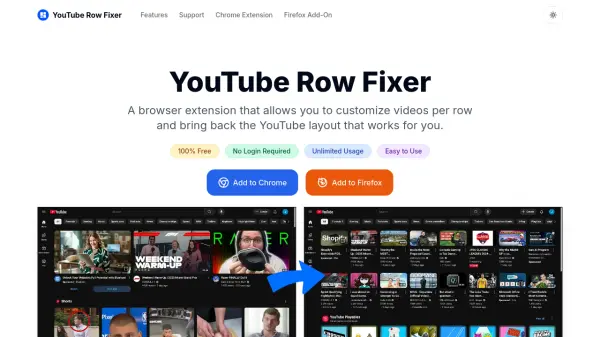
YouTube Row Fixer is a browser extension designed for desktop Chrome and Firefox users, offering enhanced customization options for their YouTube viewing experience. The extension allows users to easily set the number of videos and Shorts displayed per row, bringing back a familiar and efficient layout that maximizes usage of large or ultrawide monitors. Users can adjust the density of community posts, remove or hide YouTube Shorts entirely, and even disable channel profile avatars for a distraction-free, content-focused interface.
With a simple, intuitive settings panel, YouTube Row Fixer ensures all preferences are saved locally in the browser for privacy and convenience. No login or account creation is required, and all features are provided for free, without subscriptions or paywalls. This tool is ideal for users seeking to tailor their YouTube layout to their viewing habits and screen size, restoring features lost in recent platform updates.
Features
- Custom Row Count: Set how many videos and Shorts appear per row on YouTube.
- Community Post Control: Adjust or hide the number of community posts per row.
- Hide Shorts: Completely remove YouTube Shorts from the feed.
- Hide Channel Avatars: Disable channel profile thumbnails for a cleaner layout.
- Local Settings Storage: All user preferences are saved privately within the browser.
- Seamless Integration: Works smoothly with the YouTube desktop experience.
- No Account Needed: Use all features immediately without sign-up.
- Unlimited Free Usage: No charges, premium features, or usage limits.
Use Cases
- Restoring a familiar multi-row YouTube layout after recent updates.
- Optimizing YouTube for widescreen or large monitors.
- Hiding YouTube Shorts and unnecessary channel thumbnails for focused content viewing.
- Customizing the density of community posts on your YouTube feed.
- Improving browsing efficiency for users who want more videos visible per screen.
FAQs
-
What is YouTube Row Fixer and what can it do?
YouTube Row Fixer is a browser extension that lets you customize how many videos, Shorts, and community posts appear in each row on YouTube, as well as hide Shorts, disable community posts, and remove channel profile pictures. -
Is YouTube Row Fixer free to use?
Yes, YouTube Row Fixer is completely free with no premium features, subscriptions, or hidden costs. -
Can I hide YouTube Shorts with this extension?
Yes, a simple toggle allows you to completely hide Shorts from your YouTube feed. -
Does YouTube Row Fixer work on mobile devices?
No, YouTube Row Fixer is designed for desktop browsers and does not support mobile devices. -
Where are my settings saved?
All settings are stored locally in your browser, ensuring privacy and persistence across sessions.