What is Xnapper?
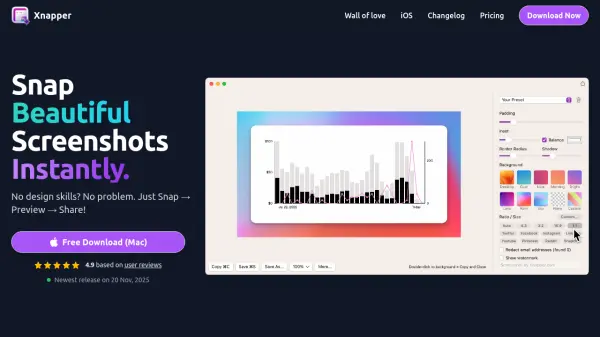
Xnapper is a native macOS application designed to simplify the process of creating visually appealing screenshots. It enables users to capture, edit, and share screenshots quickly without requiring any design expertise. The tool automates key aspects of screenshot enhancement, such as balancing composition and adjusting background colors, to produce professional results in seconds.
Additional features include automatic redaction of sensitive information like emails and API keys, easy text selection powered by macOS vision engine, and customization options including gradients, shapes, and social media presets. Xnapper operates on-device for fast performance and offers a one-time payment model to remove watermarks, with a free version available for basic use.
Features
- Automatic Balance Screenshot: Makes screenshots perfectly balanced with zero effort
- Automatic Background Color: Focuses on content by handling background adjustments automatically
- Automatic Redact Sensitive Information: Hides emails, credit cards, IP addresses, and API keys with a single click
- Select and Copy Text Easily: Powered by built-in macOS vision engine for text recognition
- Custom Global Shortcut: Allows users to set custom shortcuts for quick access
- Social Media Sizes & Ratios: Includes presets for various social media platforms
- Screenshot History: Keeps a history of past screenshots for easy access
- Compress Output Image: Reduces image file size without significant quality loss
Use Cases
- Creating professional screenshots for presentations
- Redacting sensitive information from screenshots for security
- Preparing social media content with optimized image sizes
- Documenting software interfaces for tutorials or documentation
- Sharing quick visual updates in team communications
FAQs
-
How does the license renewal work after one year?
After one year, you can renew your license at a 40% discount for another year of updates. If you don't renew, you can continue using the last version indefinitely. -
Can I transfer my license to another computer?
Yes, you can unlink a device via Xnapper Preferences or the License Manager and activate it on another computer. -
Is VAT included in the pricing?
VAT may or may not be included based on your country; check your receipt email for details on VAT refunds. -
Can I use the same license key for the iOS app?
No, the iOS app must be purchased separately from the Apple App Store. -
What is the refund policy?
There is a 30-day money-back guarantee with no questions asked; contact support for refunds.