What is Watchlog?
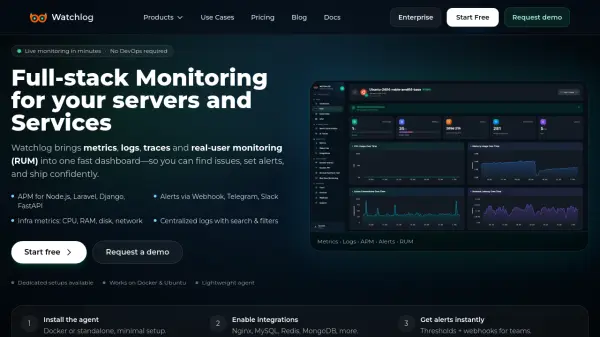
Watchlog is a comprehensive full-stack monitoring and observability platform designed for modern development teams. It provides unified monitoring capabilities across infrastructure, applications, APIs, logs, and real-user experiences through a single dashboard interface. The platform enables teams to collect and analyze server metrics, application performance data, logs, and user interactions in real-time.
The system offers AI-powered monitoring features including AI traces for monitoring large language model calls, latency, and outputs. It supports various deployment options including Docker, Kubernetes, Linux, Windows, and macOS environments. Watchlog provides alerting capabilities through multiple channels including webhooks, Slack, Telegram, and email, allowing teams to respond quickly to incidents and performance issues.
Features
- Full-stack Observability: Unified monitoring across infrastructure, applications, APIs, logs, and real-user experiences
- AI Traces: Monitor AI model calls, latency, outputs, and safety signals for generative AI applications
- Real-time Alerting: Threshold-based alerts with notifications via webhooks, Slack, Telegram, and email
- Lightweight Agent: Minimal setup required with support for Docker, Kubernetes, Linux, Windows, and macOS
- Custom Dashboards: Build tailored monitoring dashboards with charts, tables, and visualization tools
Use Cases
- Monitoring server infrastructure performance and resource utilization
- Tracking application performance and identifying bottlenecks in production environments
- Monitoring generative AI applications and large language model deployments
- Real-user experience monitoring and web performance optimization
- Incident detection and alerting for DevOps and SRE teams
FAQs
-
What deployment options does Watchlog support?
Watchlog supports multiple deployment options including Docker containers, Kubernetes clusters, and traditional server environments on Linux, Windows, and macOS operating systems. -
How quickly can I start monitoring with Watchlog?
You can start monitoring in under 60 seconds by signing up, installing the lightweight agent, and configuring basic monitoring settings. -
What types of integrations does Watchlog support?
Watchlog supports integrations with various technologies including NGINX, MySQL, Redis, MongoDB, PostgreSQL, Docker, Kubernetes, IIS, and PM2 process manager. -
Can I monitor custom business metrics with Watchlog?
Yes, Watchlog allows you to send and monitor custom business events and metrics with configurable thresholds and alerting rules. -
What security features does Watchlog offer for enterprise deployments?
Enterprise deployments offer single-tenant instances with custom branding, data isolation, SSO/SAML authentication, and fine-grained access controls for compliance requirements.