What is Wakefy?
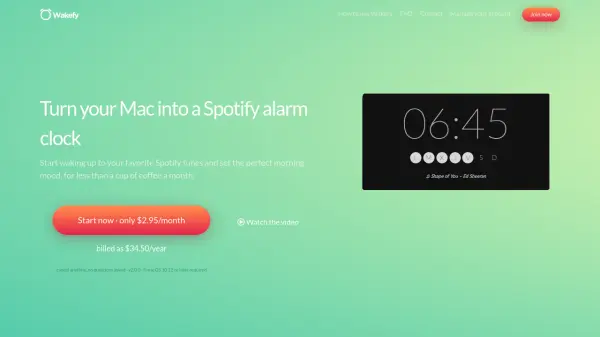
Wakefy is a macOS application that transforms your Mac into a smart alarm clock powered by Spotify. Instead of using traditional alarm sounds, Wakefy wakes you up with your favorite Spotify songs, playlists, or albums, allowing you to set the perfect morning mood. The app is designed for makers, students, and young professionals who want a more pleasant and effective wake-up experience. Wakefy can automatically power on your Mac from sleep mode when the alarm is set, so you don't need to keep your computer on all night. It also supports turning off your Mac completely and waking it up, provided certain conditions are met.
One of the key benefits of Wakefy is that it forces you to physically get out of bed to turn off the alarm, as your Mac is typically located away from your bedside. This helps prevent oversleeping and encourages a more active start to the day. The app uses a subscription model to ensure continued development and support. Wakefy is compatible with macOS 10.12 or later and requires the official Spotify app and an active internet connection.
Features
- Spotify Integration: Wakes you up with your favorite Spotify songs, playlists, or albums.
- Auto Power On: Automatically wakes your Mac from sleep or powers it on when the alarm is triggered.
- Physical Alarm: Forces you to get up and walk to your Mac to turn off the alarm, reducing oversleeping.
- Playlist Shuffle: Shuffles songs from a playlist to prevent getting used to a single alarm tone.
- 24-Hour Clock: Uses military time format for alarm setting.
- Full Disk Access: Requires permissions to manage system sleep/wake settings.
Use Cases
- Waking up to personalized Spotify music instead of traditional alarm sounds.
- Forcing yourself to get out of bed by placing the Mac away from the bedside.
- Using as a backup alarm when traveling or when your phone battery is low.
- Setting a morning routine with music that matches your desired mood.
- For students and professionals who work late on their Mac and want to ensure they wake up on time.
FAQs
-
Does Wakefy work on Apple Silicon Macs?
Yes, Wakefy works on Macs with Apple Silicon (M1 chip) using Rosetta translation. A native ARM version is planned for a future release. -
Can Wakefy wake my Mac from sleep?
Yes, Wakefy can wake your Mac from sleep mode automatically when the alarm is set. It can also power on a Mac that is completely turned off if connected to power and password-protected login is disabled. -
Is Wakefy safe to use?
Yes, Wakefy is safe. It is digitally signed and notarized by Apple, virus-free, and malware-free. It only performs the tasks described: scheduling wake-up and playing Spotify music. -
Why does Wakefy require Full Disk Access?
Wakefy needs Full Disk Access to edit system files that manage automatic wake-up. This is required by macOS for security, and there is no more specific permission available. -
How do I cancel my Wakefy subscription?
You can cancel your subscription by logging into your personal Wakefy Account Dashboard and managing your billing and payment details.