Lyric Fever favicon

Lyric Fever
The best Apple Music & Spotify Lyrics experience for macOS.

What is Lyric Fever?

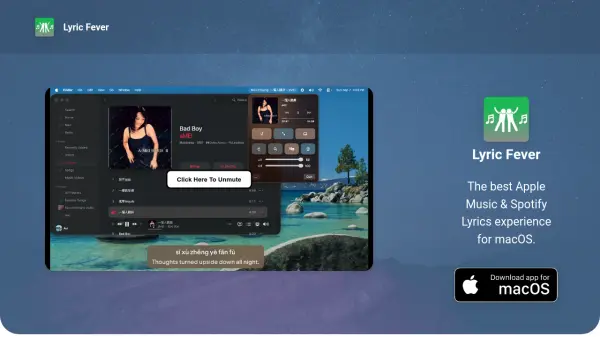
Lyric Fever provides a seamless lyrics viewing experience for macOS users by integrating with Apple Music and Spotify. It automatically downloads lyrics from multiple sources including Spotify, LRCLIB, and NetEase, ensuring comprehensive coverage for various tracks.

The tool offers features such as automatic translation of lyrics, a fullscreen mode modeled after Apple Music, and a karaoke mode with a floating window that stays on top of other applications. Privacy is prioritized with no collection or storage of personal information.

Features

  • Apple Music and Spotify Support: Instantly view lyrics from both Apple Music and Spotify in the macOS menubar.
  • Automatic Downloads: Automatically downloads lyrics from Spotify, LRCLIB, and NetEase.
  • Translation: Automatically translates lyrics for better understanding.
  • Karaoke Mode: A lyric window that stays on top of all other windows for karaoke sessions.
  • Fullscreen Mode: Fullscreen mode modeled after Apple Music for an immersive experience.
  • Privacy-focused: No personal information is collected or stored, ensuring user privacy.

Use Cases

  • Enhancing music listening by viewing lyrics in real-time
  • Learning song lyrics for karaoke sessions
  • Understanding foreign language songs through automatic translation
  • Improving music engagement with a fullscreen lyrics display
  • Accessing lyrics conveniently from the macOS menubar

Related Tools:

Blogs:

  • Best text to speech AI tools

    Best text to speech AI tools

    Text-to-speech (TTS) AI tools are designed to convert written or text-based content into natural-sounding spoken audio. These tools utilize various deep learning and neural network architectures to generate human-like speech from textual input.

  • Top 6 AI note-taking tools for 2026: in-person, online, and hybrid use cases

    Top 6 AI note-taking tools for 2026: in-person, online, and hybrid use cases

    Most AI note-taking lists are really lists of meeting bots, which join your video call and transcribe it. That's useful, but it's half the picture. Decisions happen in hallway conversations, client dinners, on-site visits, and hybrid rooms where nobody is on a video link. This guide covers different parts of the note-taking workflow: hardware capture for in-person settings, platform-native tools for online calls, and AI layers for organizing and synthesizing what you've captured. It compares six tools by capture context, workflow fit, pricing, and limitations.

  • Top AI tools for Teachers

    Top AI tools for Teachers

    Explore the top AI tools designed for teachers, revolutionizing the education landscape. These innovative tools leverage artificial intelligence to enhance teaching efficiency, personalize learning experiences, automate administrative tasks, and provide valuable insights, empowering educators to create engaging and effective educational environments.

Didn't find tool you were looking for?

Be as detailed as possible for better results