VideoMark favicon

VideoMark
Take awesome notes on online videos

What is VideoMark?

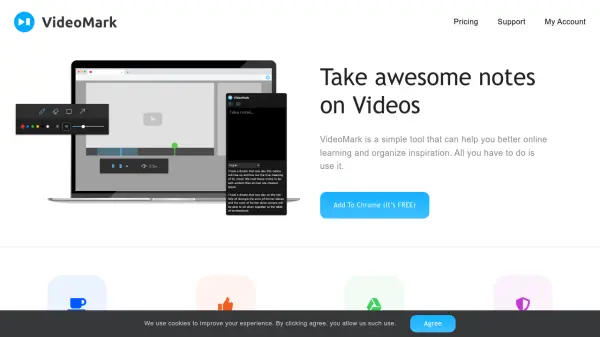
VideoMark is a simple yet powerful browser tool that enhances online learning and inspiration gathering. It allows users to take notes directly on videos using intuitive drawing tools, capture screenshots and subtitles, and organize everything with hashtags. Notes are automatically saved to Google Drive, ensuring privacy and security. The tool supports popular platforms like YouTube and Coursera, with more under development.

Features

  • Drawing tools: Mark up videos directly with simple drawing tools
  • Autosave to Google Drive: All notes and drawings are automatically saved
  • Screenshot and subtitle capture: Save important video frames and text
  • Hashtag organization: Tag and browse notes efficiently
  • Speed control and A-B loop: Useful playback controls for learning

Use Cases

  • Taking notes on educational videos from Coursera, Udemy, or YouTube
  • Collecting screenshots and clips for content creation
  • Organizing inspiration from online video resources
  • Studying musical instruments or technical skills with video annotation

FAQs

  • How is the Unlimited plan different from the Free?
    The Free plan allows up to 50 video notes, while the Unlimited plan offers unlimited notes with additional features like priority support.
  • How is the payment being processed? Can I pay with PayPal?
    Payment is handled through Paddle, and PayPal is fully supported as a payment method.
  • Do you have monthly and yearly billing options?
    Yes, we offer both monthly and yearly billing options. The yearly option is cheaper.
  • How can I cancel my subscription?
    You can cancel your subscription from the Billing page. This stops automatic renewal, but you retain access to Unlimited features until the end of your current billing cycle.

Related Queries

Helpful for people in the following professions

Related Tools:

Blogs:

  • Top 6 AI note-taking tools for 2026: in-person, online, and hybrid use cases

    Top 6 AI note-taking tools for 2026: in-person, online, and hybrid use cases

    Most AI note-taking lists are really lists of meeting bots, which join your video call and transcribe it. That's useful, but it's half the picture. Decisions happen in hallway conversations, client dinners, on-site visits, and hybrid rooms where nobody is on a video link. This guide covers different parts of the note-taking workflow: hardware capture for in-person settings, platform-native tools for online calls, and AI layers for organizing and synthesizing what you've captured. It compares six tools by capture context, workflow fit, pricing, and limitations.

  • Best AI Tools For Startups

    Best AI Tools For Startups

    we've compiled a straightforward list of user-friendly AI tools designed to give startups a boost. Discover practical solutions to streamline everyday tasks, enhance productivity, and gain valuable insights without the need for a tech expert. Learn where and how these tools can be applied in your startup journey, from automating repetitive tasks to unlocking powerful data analysis. Join us as we explore the features that make these AI tools accessible and beneficial for startups in various industries. Elevate your business with technology that works for you!

  • Best AI tools for Product Photography

    Best AI tools for Product Photography

    Explore top AI tools that can elevate your product photography, helping you enhance images, streamline workflows, and create professional visuals with ease.

  • AI thumbnail maker tools

    AI thumbnail maker tools

    Automatically generate visually appealing and optimized thumbnails for various digital content, streamlining the design process and enhancing visual engagement

Didn't find tool you were looking for?

Be as detailed as possible for better results