What is Vert?
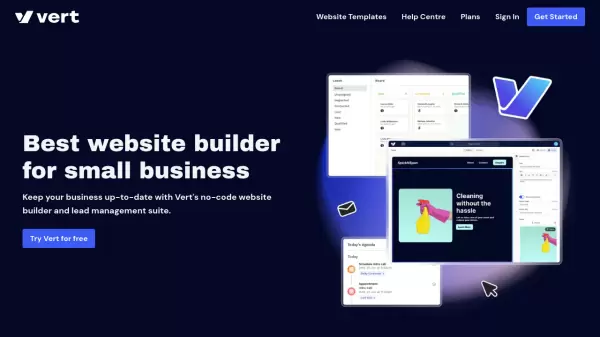
Vert is a user-friendly website building platform that combines the simplicity of no-code development with powerful business management tools. The platform enables users to create professional websites by simply picking, filling, and stacking pre-designed blocks, eliminating the need for coding or design expertise.
Beyond website creation, Vert offers an integrated suite of business tools including lead management, contact form creation, and task tracking capabilities. The platform also features built-in AI tools for content creation, making it a complete solution for small businesses looking to establish and maintain their online presence.
Features
- No-Code Builder: Create websites without coding or design skills
- Block-Based Design: Pick, fill, and stack pre-designed blocks
- Lead Management: Track sales journey and communication history
- Form Builder: Create custom contact forms for visitor engagement
- Task Management: Track and manage appointments and tasks
- AI Content Tools: Generate professional content and website pages
- Mobile Optimization: Websites work across multiple devices
- Advanced Customization: Support for custom blocks and external scripts
Use Cases
- Creating professional business websites
- Managing customer relationships
- Collecting customer inquiries and feedback
- Scheduling and tracking appointments
- Generating website content
- Building sports club websites
- Creating service business websites
- Managing construction company online presence
FAQs
-
Is a domain name included with Vert?
Yes, a free domain name for one year is included with the Expert Web Design & Support plan. -
Can I try Vert before purchasing?
Yes, Vert offers a free 3-day trial with no credit card required. -
Does Vert include hosting and SSL security?
Yes, all plans include world-class hosting with SSL security.