What is Vecta?
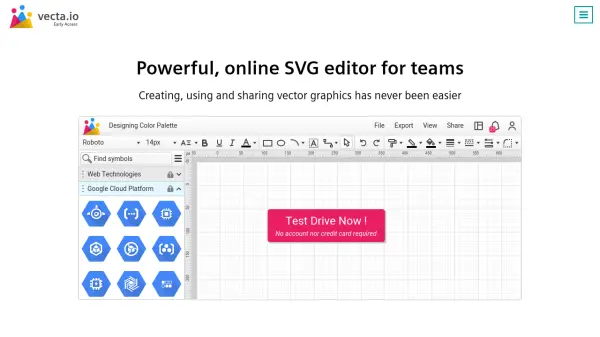
Vecta is an advanced online vector graphics editor designed specifically for team collaboration and professional diagram creation. This powerful tool combines precision editing capabilities with extensive file format support, allowing users to import and edit Autocad drawings, Visio stencils, and drawings directly within the platform. With multiple measurement units, scaling tools, and 6400% zoom functionality, Vecta ensures pixel-perfect accuracy across all output formats including PNG, JPG, SVG, and PDF.
The platform features a fully extensible architecture with JavaScript-based plugins that enable users to create custom functionality, from drawing fractal trees to generating Bills of Materials automatically. Vecta includes a built-in SVG minifier that reduces file sizes by an average of 22% while maintaining font integrity, making it ideal for web graphics and digital applications. The editor provides access to over 800 web fonts, advanced shape operations, smart connectors, and a rich color palette with linear and radial gradients for creating professional diagrams.
Features
- JavaScript Plugins: Create custom plugins to extend functionality with fractal drawing and automated diagram generation
- SVG Minifier: Built-in optimization that reduces SVG file sizes by 22% on average while preserving font integrity
- File Import: Support for Autocad drawings (*.dwg) and Visio files (*.vsd, *.vss) with more formats coming
- Precision Tools: Multiple measurement units (pixels, mm, cm, inches) with 6400% zoom for pixel-perfect accuracy
- Real-time Collaboration: Team-based dashboard with built-in chat, notifications, and simultaneous editing capabilities
- Advanced Shape Operations: Fragment, union, difference, intersect, join and trim tools for professional graphics
- Smart Connectors: Automatic shape connection tools for efficient diagram creation
- Rich Font Library: Access to over 800 web fonts from Google Fonts with text outlining capabilities
Use Cases
- Creating technical diagrams and blueprints for engineering projects
- Designing infographics and visual presentations for business communications
- Developing web graphics and SVG assets for digital applications
- Collaborating on design projects with distributed teams in real-time
- Converting Autocad and Visio files to editable SVG format
- Optimizing SVG files for web performance with built-in minification
- Creating custom symbols and icons for design systems and libraries
- Generating automated diagrams from data using JavaScript plugins