The model returns correct answers in the playground, but production shows
garbled unicode ai output:
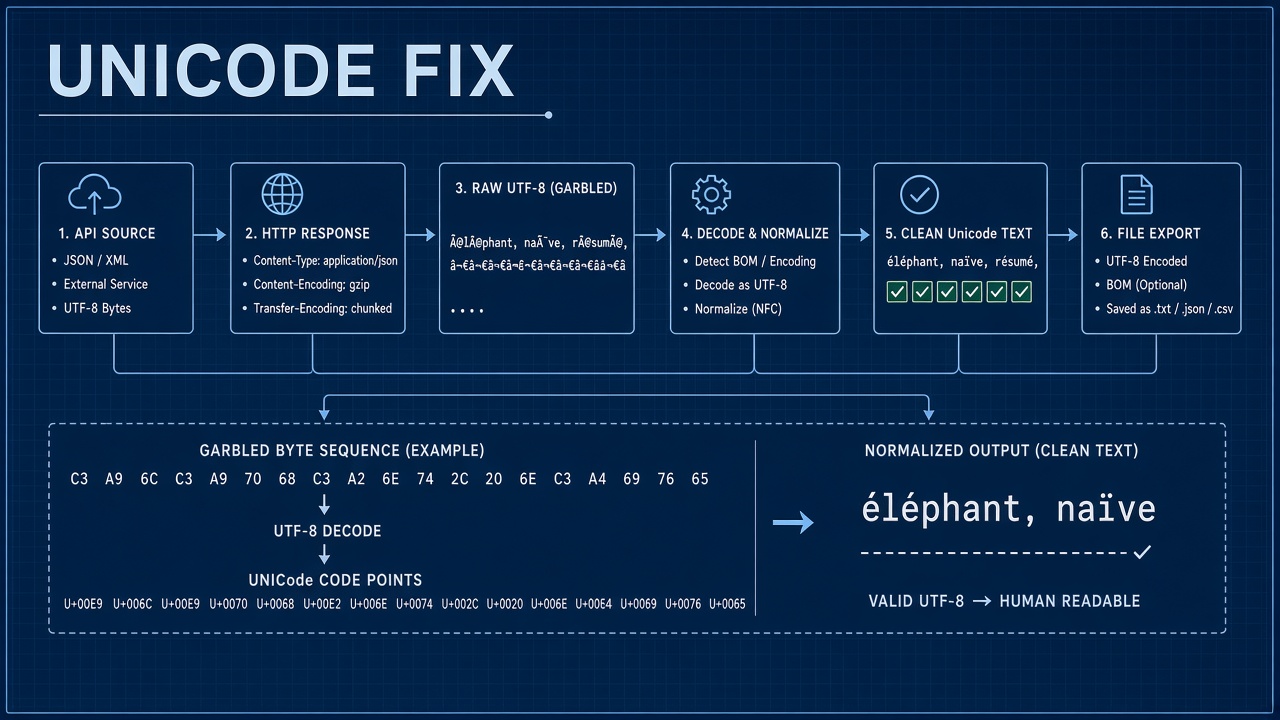
mojibake like é instead of é, diamond question marks, or broken emoji. The LLM
emitted valid Unicode; something between API response and user screen misinterpreted bytes. Fix encoding
end to end rather than re-prompting.
Multilingual products, developer tools, and AI code assistants that emit source files hit this often when stacks mix Latin-1 defaults with UTF-8 content. Teams in AI coding workflows exporting CSV or pasting into Excel see the same symptoms without touching the model at all.
UTF-8 End to End
Standardize on UTF-8 without BOM from API ingestion through storage, processing, and render. UTF-8 encodes all Unicode code points. Legacy Windows-1252 or ISO-8859-1 layers in the stack reinterpret multi-byte sequences as separate characters, producing visible corruption.
Audit every hop:
- HTTP client decodes response body as UTF-8 (default in modern fetch/axios with correct headers).
- Application runtime string type is Unicode-aware (Python 3 str, Java String, not byte arrays left ambiguous).
- Log appenders and log aggregation do not strip non-ASCII.
- Message queues serialize JSON as UTF-8 with escaped non-ASCII allowed.
- Frontend renders with
<meta charset="utf-8">and UTF-8 asset bundles.
Quick test: log the code point of a known character (e.g., U+00E9 for é) at each layer. If code point is correct in API handler but wrong in database read, suspect DB client encoding. If correct in DB but wrong in browser, suspect HTML charset or double encoding in template escape.
| Symptom | Likely layer | Fix |
|---|---|---|
| é instead of é | UTF-8 read as Latin-1 | Set UTF-8 on reader and DB connection |
| Question marks in boxes | Font or missing glyph | Use font with emoji/CJK coverage |
| Broken after save reload | Database charset | utf8mb4 column and connection |
| Broken only in Excel | CSV without BOM | UTF-8 BOM or import wizard UTF-8 |
HTTP Content-Type Charset
Responses and requests must declare charset=utf-8 when bodies are text.
Content-Type: application/json; charset=utf-8 is explicit best practice though JSON is defined
as UTF-8. HTML pages without charset meta default to browser quirks mode guesses. Streaming SSE from chat
APIs must use UTF-8 decoder on the client; treating stream as Latin-1 corrupts incrementally.
Reverse proxies sometimes strip charset from upstream. Verify actual response headers in browser Network tab, not only application code. gzip compression preserves encoding but misconfigured middleware may decode bytes with wrong charset before re-encoding.
File downloads of generated text (markdown, code) should set
Content-Type: text/plain; charset=utf-8 and
Content-Disposition filename with UTF-8 filename* parameter for non-ASCII names.
Database Column Encodings
MySQL and MariaDB need utf8mb4 tables and connections to store emoji and full Unicode.
Legacy utf8 three-byte charset truncates four-byte characters. PostgreSQL defaults are safer
but client encoding must still be UTF8. SQLite stores UTF-8 text if application writes UTF-8 bytes.
Migration checklist:
- Column type TEXT/VARCHAR with utf8mb4_unicode_ci or equivalent collation.
- Connection string
charset=utf8mb4in ORM config. - Avoid
CONVERToperations that pass through Latin-1 assumptions. - Index length limits on utf8mb4 varchar; plan column sizes for CJK.
- Backup and restore tools preserve encoding; test restore on staging with emoji sample rows.
ORMs like Eloquent use parameter binding that handles Unicode when connection charset is correct. Raw SQL dumps opened in Latin-1 terminal corrupt display without corrupting stored data; distinguish display bugs from storage bugs.
Redis and cache encoding
Redis stores byte strings. JSON-encode chat history as UTF-8 before SET. Reading with wrong client decoding causes subtle corruption in conversation replay for code assistants that cache context windows.
Export BOM and Excel Issues
Excel on Windows often assumes CSV is system ANSI unless UTF-8 BOM is present. Export
generated reports with \xEF\xBB\xBF BOM prefix when target audience opens files in Excel.
Alternatively export XLSX with a library that sets Unicode internally. Google Sheets import usually handles
UTF-8 CSV without BOM when charset is selected in import dialog.
Developers copying AI output from terminal to Slack or Jira should use UTF-8 capable terminal emulators. CI logs encoding misconfiguration shows as failures only on non-English test fixtures; add emoji and accented character assertions to integration tests.
PDF generation pipelines need embedded fonts with glyphs for used scripts. Missing font subsetting replaces CJK with tofu boxes even when string data is perfect UTF-8 in memory.
API Streaming and JSON Escape
Streaming parsers must accumulate UTF-8 code units across chunk boundaries. Splitting multibyte character across TCP chunks and decoding per chunk causes replacement characters. Use framework streaming JSON parsers tested with multilingual fixtures.
Double JSON encoding (stringify twice) escapes Unicode to \u00e9 which is valid but ugly; triple
mishandling produces visible backslashes in UI. Parse once at boundary; pass native strings inside app.
Logging and Observability
Log aggregation systems that assume ASCII may mangle multilingual support tickets copied from chat logs. Configure Splunk, Datadog, and CloudWatch to treat log streams as UTF-8. When support pastes garbled customer examples into tickets, verify whether corruption happened in export from your admin panel or in the customer browser. Attach raw JSON response file to tickets instead of screenshot when debugging encoding disputes with vendor.
Metrics to track: percentage of responses containing non-ASCII code points, rate of user-reported mojibake tickets per locale, failed database inserts on emoji. Spikes after deploy implicate recent template or middleware change rather than model regression.
Debugging Checklist
- Capture raw API response bytes; confirm UTF-8 validity with
iconvorchardet. - Compare hex of problematic substring at API, app, DB, and UI layers.
- Reproduce outside Excel and browser (plain UTF-8 file in VS Code).
- Fix lowest layer where corruption first appears.
- Add regression test with emoji, RTL text, and combined marks.
Framework-Specific Pitfalls
PHP, Node, and Python defaults are UTF-8 aware today, but legacy config files and mail transports
are not. In Laravel, set DB_CHARSET=utf8mb4 in database config, use
json_encode with JSON_UNESCAPED_UNICODE when building manual JSON strings, and
ensure mail.charset is utf-8 for multilingual notification bodies. Blade templates inherit
layout charset; API resources should return JSON with Unicode literals unless clients require escapes.
Node.js fs.writeFileSync without encoding option writes UTF-8 on modern Node, but older
scripts passing buffers from latin1 sockets corrupt output. Python 2 style .encode('utf-8')
on already-encoded bytes double-encodes. In browser React apps, ensure fetch uses response.text()
not manual ArrayBuffer decoding with wrong label.
Normalization and Composed Characters
Unicode allows multiple byte sequences for the same visual character (composed vs decomposed é). String comparison and search break when one layer normalizes NFC and another stores NFD. Normalize to NFC at ingestion boundary for user-generated content and AI outputs stored for search. Hashing and deduplication pipelines should normalize before hash.
Copy Paste and Clipboard
Copying from PDF or Word into a code assistant chat may insert smart quotes, non-breaking spaces, or legacy encodings that look like ASCII in the textarea but break compilers. Sanitize pasted source with a normalize step or warn when non-ASCII appears in supposed ASCII-only code blocks. The model is not wrong; the clipboard carried hidden characters.
Testing Multilingual Fixtures
Add automated tests that assert exact Unicode round trip for representative strings. Fixture set should include combining characters, zero-width joiners, CJK unified ideographs, Arabic presentation forms, emoji skin tone modifiers, and mathematical symbols. Run tests against API response handler, database persistence layer, and CSV export path independently. Failures isolated to one layer narrow fix scope dramatically.
Snapshot tests on HTML output must declare UTF-8 in test runner config. Jest and PHPUnit both support UTF-8 when project encoding is set; legacy CI images defaulting to C locale have caused false green tests locally and red production for coding products with international users.
Incident Response for Encoding Bugs
When users report widespread mojibake after a deploy, roll forward with charset fix rather than attempting to repair already corrupted rows unless you have byte-level backups. Identify first corrupted write timestamp, quarantine affected records, and replay from clean API logs if retained. Communicate clearly that model quality was not the issue to avoid unnecessary prompt changes that mask infrastructure defects.
The Bottom Line
Garbled unicode ai output is fixed by enforcing UTF-8 from API through database to export, declaring charset on HTTP responses, using utf8mb4 storage, and adding BOM when Excel is the consumer. Test with emoji, accented Latin, CJK, and RTL samples in CI. The model already speaks Unicode; your pipeline must carry bytes without reinterpretation.
Frequently Asked Questions
Why does Arabic or Hebrew render backwards or disjoint?
RTL scripts need dir="rtl" on container and Unicode bidi algorithm support in UI framework.
Storage as UTF-8 is still correct; rendering layer must apply direction. Mixed LTR code snippets inside RTL
paragraphs need dir="auto" or isolated spans.
Emoji show as squares in our app but fine in vendor UI. Why?
Font stack lacks color emoji glyphs or OS emoji font not loaded in webview. Data is likely fine. Update CSS font-family to include emoji-capable fonts. Verify utf8mb4 if emoji fail only after database round trip.
Code assistant saves files with wrong encoding. How to fix?
IDE or plugin defaulting to system encoding. Set project to UTF-8 in editorconfig and IDE settings. Write files with explicit UTF-8 in automation scripts from coding agents.
Only one language breaks. Is the model at fault?
Unlikely if playground shows correct text for same prompt. Compare headers and DB charset for requests hitting different app servers; config drift between nodes causes language-specific bugs when one node serves certain locales.
Should API return \u escapes or literal UTF-8?
Both are valid JSON. Literal UTF-8 is more readable in logs. Ensure client parser handles either. Problems arise when manual string replacement breaks escape sequences.