What is TreeSnap?
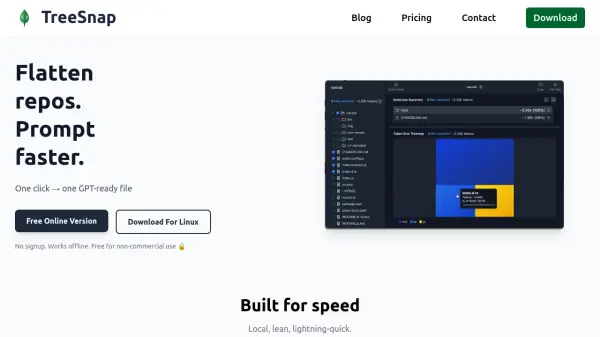
TreeSnap is an offline tool designed to rapidly flatten and prepare entire code repositories for prompt-based AI workflows. Powered by a native Rust core, it processes up to 50,000 files in around one second, helping developers trim, structure, and optimize code inputs for LLMs without exposing sensitive information to the cloud. Its interactive interface provides clear token counts by file and folder and generates treemaps to identify the heaviest sections of codebases, allowing users to fit data within any context window efficiently. Features like .gitignore compliance and instant directory selection ensure only relevant code is included in each export, maximizing accuracy and minimizing unnecessary context for AI analysis.
Users can seamlessly export both concatenated code files and clean ASCII file tree structures, making it easy to communicate the complete structure and content of a repository to any LLM or code analysis tool. Built for speed, privacy, and ease of use, TreeSnap empowers developers and technical teams to streamline code preparation for Large Language Models, fit selections into LLM context windows, and improve the effectiveness of AI-driven code review and analysis—all on their own devices without risk of data leakage.
Features
- Ultra-Fast Processing: Analyze codebases with up to 50,000 files in approximately one second.
- Offline and Secure: All operations are performed locally; no cloud uploads or data leaks.
- Token Count Visualization: Provides clear token counts for every file and directory.
- Interactive Treemap: Instantly spot the largest code sections for better context fitting.
- .gitignore Compliance: Automatically excludes irrelevant code based on .gitignore files.
- Directory and File Selection: Effortlessly select individual folders or entire directories.
- Export File Tree Structures: Produces clean ASCII representations of file trees alongside code.
- No Signup Required: Instant access without the need for user registration.
- Cross-Platform Support: Works on macOS, Linux, and Windows.
Use Cases
- Preparing large code repositories for LLM-powered code review or analysis.
- Optimizing code selections to fit within an LLM's context window.
- Reducing token usage and associated costs in AI-assisted coding tasks.
- Creating context-constrained prompt files for Copilot, ChatGPT, or other code-focused AI tools.
- Generating ASCII file tree diagrams for documentation or AI input.
- Ensuring private, offline processing of sensitive codebases for compliance or IP protection.
FAQs
-
Does TreeSnap work completely offline?
Yes, TreeSnap performs all operations locally on your device, ensuring your code never leaves your machine. -
Is there a free version available?
Yes, there is a free version of TreeSnap for non-commercial use, supporting unlimited open-source and personal projects. -
What platforms does TreeSnap support?
TreeSnap runs on macOS, Linux, and Windows. -
How is sensitive data protected when using TreeSnap?
TreeSnap processes all files locally and does not upload any data to external servers, maximizing privacy and data security. -
Can TreeSnap handle projects with a large number of files?
Yes, TreeSnap is optimized for speed and can analyze codebases with up to 50,000 files in about one second.