What is Gitprobe?
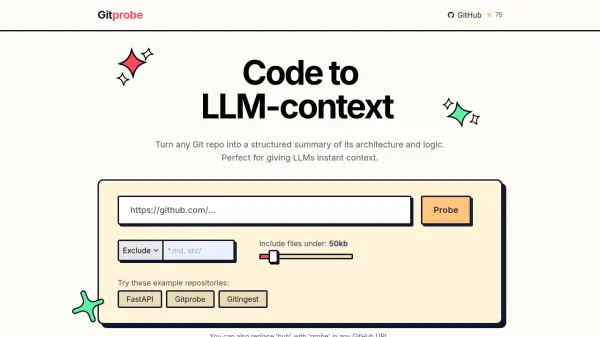
Gitprobe is an AI-powered tool designed to convert any Git repository into a detailed, structured summary of its architecture and logic. This enables users, including developers and large language models (LLMs), to understand complex codebases quickly and efficiently.
By streamlining the process of digesting code, Gitprobe offers instant repository context—ideal for onboarding, code analysis, or enhancing AI-driven integrations. Users can easily include or exclude files, specify size limits, and use Gitprobe by modifying GitHub URLs directly, making it accessible and user-friendly for a wide range of development and analysis purposes.
Features
- Structured Summaries: Generates comprehensive architecture and logic summaries of any Git repository.
- Direct GitHub Integration: Allows usage by replacing 'hub' with 'probe' in any GitHub URL.
- Customizable File Selection: Supports the inclusion or exclusion of files and folders, with size filters.
- LLM Context Support: Delivers instant codebase context specifically optimized for large language models.
- Example Repository Analysis: Offers sample repository summaries for immediate demonstration.
Use Cases
- Onboarding developers to new codebases quickly.
- Providing LLMs with precise and structured codebase context.
- Facilitating rapid architectural reviews or audits.
- Assisting in technical documentation and internal knowledge sharing.
- Enhancing AI-assisted code generation and analysis workflows.