What is Torque?
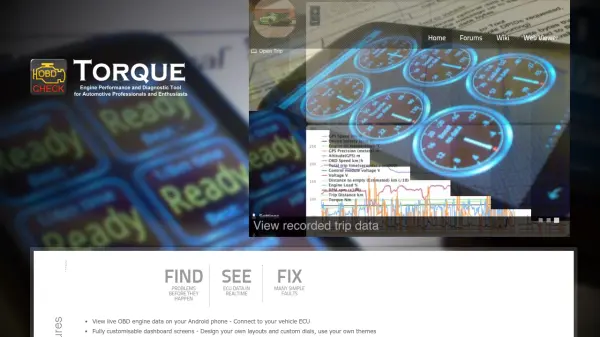
Torque is an advanced OBD2 diagnostic application designed for Android devices, enabling users to connect directly to their vehicle's Engine Control Unit (ECU). The tool provides real-time access to engine data, allowing for comprehensive monitoring and diagnostics. Users can view live OBD engine data on their Android phones, helping to identify potential issues before they escalate into major problems.
The application features fully customizable dashboard screens where users can design their own layouts and custom dials, applying personalized themes for an optimized viewing experience. Torque also retrieves Fault Codes (DTCs) and clears Check Engine lights, with built-in databases offering detailed fault descriptions. Additionally, it supports uploading live OBD2 data to webservers or the Torque web viewer in real-time and includes performance widgets for metrics such as BHP, torque, 0-60 times, and quarter-mile measurements.
Features
- Real-time OBD Engine Data: View live engine data from the vehicle's ECU on Android devices
- Customizable Dashboard Screens: Design personal layouts and custom dials with user-defined themes
- Fault Code Retrieval and Clearing: Retrieve DTCs and clear Check Engine lights with built-in fault descriptions
- Data Upload Capability: Upload live OBD2 data to webservers or the Torque web viewer in real-time
- Performance Monitoring Widgets: Check vehicle performance with BHP, torque, 0-60, and quarter-mile widgets
Use Cases
- Monitoring vehicle engine health in real-time
- Diagnosing and clearing fault codes to fix simple vehicle faults
- Customizing dashboard displays for personalized vehicle data tracking
- Uploading engine data to remote servers for analysis or sharing
- Measuring vehicle performance metrics like acceleration and power output