The Magic Spreadsheet favicon

The Magic Spreadsheet
Automate Data Enrichment and Tasks Directly in Your Spreadsheet.

What is The Magic Spreadsheet?

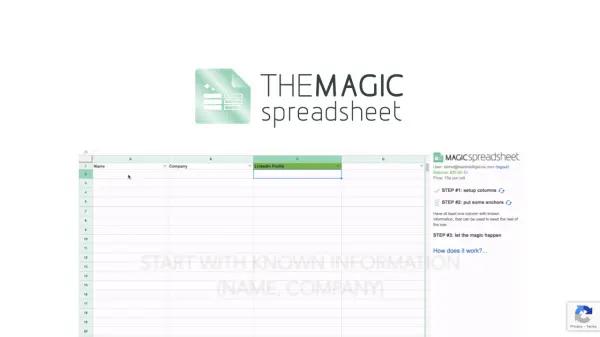
The Magic Spreadsheet integrates directly into Google Spreadsheets as an add-on, enabling users to automate data gathering and various tasks. It operates based on instructions configured by the user in a dedicated sidebar. These instructions, formatted using Markdown, specify precisely how and where to obtain required information for spreadsheet cells.

To initiate the process, users need at least one column containing 'anchor' data—pre-existing information that serves as the starting point. Once set up, The Magic Spreadsheet distributes the task of filling the remaining cells based on the provided instructions. The tool provides feedback directly within cell notes if instructions are unclear or require further details, facilitating a semi-automated workflow for data enrichment and task completion, such as finding profiles or editing images.

Features

  • Instruction Configuration: Define data sources and tasks using Markdown in a sidebar.
  • Anchor Data Seeding: Utilizes existing data in one column to initiate automation.
  • Automated Cell Population: Distributes tasks to fill spreadsheet cells based on instructions.
  • In-cell Notifications: Delivers feedback or requests clarification via cell notes.
  • Google Spreadsheets Integration: Functions as an add-on within Google Spreadsheets.

Use Cases

  • Automating the process of finding LinkedIn profiles for contacts.
  • Performing image editing tasks based on spreadsheet data.
  • Initiating phone calls based on information within the sheet.
  • Enriching spreadsheets with data gathered from various sources.
  • Automating repetitive data entry or research tasks.

Blogs:

  • Top 6 AI note-taking tools for 2026: in-person, online, and hybrid use cases

    Top 6 AI note-taking tools for 2026: in-person, online, and hybrid use cases

    Most AI note-taking lists are really lists of meeting bots, which join your video call and transcribe it. That's useful, but it's half the picture. Decisions happen in hallway conversations, client dinners, on-site visits, and hybrid rooms where nobody is on a video link. This guide covers different parts of the note-taking workflow: hardware capture for in-person settings, platform-native tools for online calls, and AI layers for organizing and synthesizing what you've captured. It compares six tools by capture context, workflow fit, pricing, and limitations.

  • Best AI tools for recruiters

    Best AI tools for recruiters

    These tools use advanced algorithms and machine learning to automate tasks such as resume screening, candidate matching, and predictive analytics. By analyzing vast amounts of data quickly and efficiently, AI tools help recruiters make data-driven decisions, save time, and identify the best candidates for open positions.

  • Best AI tools for trip planning

    Best AI tools for trip planning

    These tools analyze user preferences, budget constraints, and destination details to provide personalized itineraries, suggest optimal routes, recommend accommodations, and even offer real-time updates on weather and local events.

Didn't find tool you were looking for?

Be as detailed as possible for better results