Text to SVG favicon

Text to SVG
Convert text to SVG paths quickly and easily

What is Text to SVG?

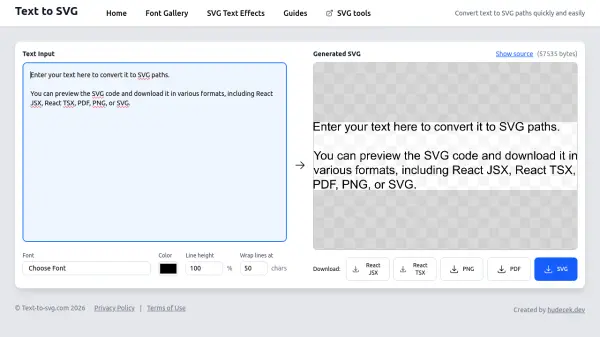
Text to SVG provides a straightforward solution for converting text into scalable vector graphics paths. Users can input their desired text and customize it with various fonts, colors, line heights, and wrap settings. The tool supports a wide range of font options, including basic fonts and Google Fonts, allowing for extensive typographic flexibility.

After generating the SVG, users can preview the code and download it in multiple formats such as React JSX, React TSX, PDF, PNG, or SVG. This makes it suitable for web development, graphic design, and other applications requiring scalable text graphics.

Features

  • Text Input: Enter custom text to convert into SVG paths with real-time preview
  • Font Selection: Choose from a wide variety of fonts including basic fonts and Google Fonts
  • Customization Options: Adjust color, line height, and wrap settings for precise control
  • Multiple Export Formats: Download generated SVG in React JSX, React TSX, PDF, PNG, or SVG formats

Use Cases

  • Creating scalable text graphics for websites
  • Generating SVG icons and logos with custom typography
  • Preparing text assets for print materials in PDF format
  • Developing React components with embedded SVG text

Related Tools:

Blogs:

  • Best AI tools for Lawyers

    Best AI tools for Lawyers

    streamline legal processes, enhance research capabilities, and improve overall efficiency in the legal profession.

  • Top AI tools for Teachers

    Top AI tools for Teachers

    Explore the top AI tools designed for teachers, revolutionizing the education landscape. These innovative tools leverage artificial intelligence to enhance teaching efficiency, personalize learning experiences, automate administrative tasks, and provide valuable insights, empowering educators to create engaging and effective educational environments.

  • Top 6 AI note-taking tools for 2026: in-person, online, and hybrid use cases

    Top 6 AI note-taking tools for 2026: in-person, online, and hybrid use cases

    Most AI note-taking lists are really lists of meeting bots, which join your video call and transcribe it. That's useful, but it's half the picture. Decisions happen in hallway conversations, client dinners, on-site visits, and hybrid rooms where nobody is on a video link. This guide covers different parts of the note-taking workflow: hardware capture for in-person settings, platform-native tools for online calls, and AI layers for organizing and synthesizing what you've captured. It compares six tools by capture context, workflow fit, pricing, and limitations.

Didn't find tool you were looking for?

Be as detailed as possible for better results