What is Swif?
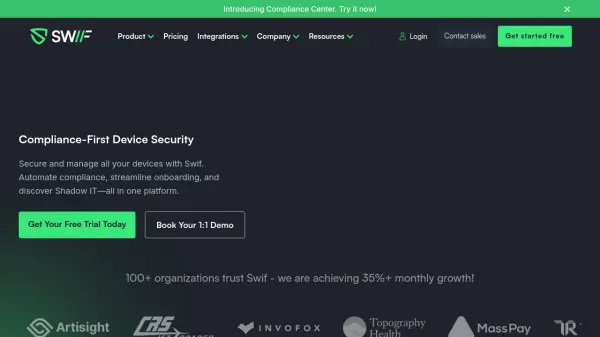
Swif is an all-in-one endpoint management platform designed to secure and manage all devices, including Linux, Windows, and macOS. It offers fast compliance readiness checks with real-time reports on compliance status, enabling organizations to automate compliance for various frameworks like SOC 2, ISO 27001, and HIPAA.
The platform helps streamline IT operations, allowing for the easy rollout of policies, custom software, and app access. Swif’s features also enhance security by facilitating the remote locking or wiping of devices. Additionally, it provides a Chrome extension to monitor AI tool usage and discover access controls across 1000+ SaaS apps.
Features
- Unified Device Management: Manage and secure all devices (Linux, Windows, macOS) from a single platform.
- Compliance Automation: Automate compliance checks and reporting for frameworks like SOC 2, ISO 27001, and HIPAA.
- Shadow IT Discovery: Monitor and control the use of unauthorized SaaS applications and AI tools.
- Remote Device Management: Lock or wipe devices remotely to secure company data.
- Automated Onboarding/Offboarding: Streamline employee provisioning and offboarding by connecting to 25+ HR systems.
- Swif Chrome Extension: Monitor AI tools use and Discover access controls across 1000+ SaaS apps in one platform.
Use Cases
- Streamlining remote IT operations for distributed teams.
- Enhancing cybersecurity by securing company data on all devices.
- Automating compliance management for various regulatory frameworks.
- Simplifying employee onboarding and offboarding processes.
- Gaining visibility and control over Shadow IT.
FAQs
-
What Operating Systems Does Swif Work With?
Swif works with Windows, MacOS, and Linux. -
Can I Connect Swif To A HRIS Like Gusto?
Yes. Swif can be connected to Gusto and 25+ other HRIS providers, allowing you to import employee data from your HRIS to Swif quickly. -
What Are The Pricing Tiers For Swif?
The number of employees determines Swif’s pricing, with a starting price of $12 per employee. The lowest tier is free. Contact us to learn more about our pricing. -
Can Swif relocate company devices from remote employees?
Yes, we partner with UPS with the logistics of retrieving your company device from your remote employee and sending it directly to your HQ. -
How Fast Can I Set Up Swif Organization?
Setting up Swif Organization will take 5 minutes or less. Here is a video explaining the process