What is Strut?
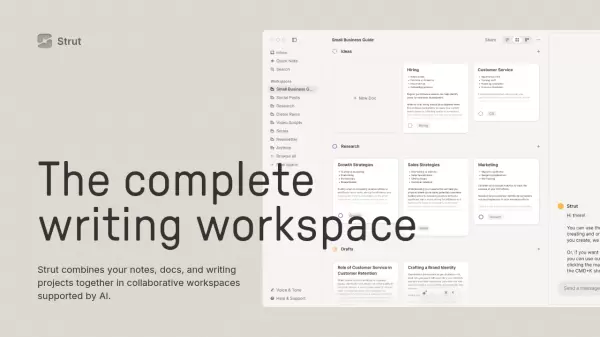
Strut is a comprehensive writing workspace that seamlessly integrates note-taking, document management, and project organization into one collaborative platform. The tool combines focused writing environments with project management capabilities, allowing users to transition smoothly between organizing projects and deep writing sessions.
Enhanced by AI capabilities, Strut offers an intelligent writing assistant that provides suggestions, edits, research support, and inspiration. The platform features real-time collaboration, customizable workspaces, and a distraction-free writing environment, all while maintaining a commitment to data privacy by never using user content for AI training.
Features
- Project Workspaces: Customizable spaces with list, grid, and board views
- Writing Inbox: Automatic organization of daily notes and ideas
- AI Collaboration: 24/7 writing assistance with document-specific chat
- Deep Focus Mode: Distraction-free typewriter-inspired writing environment
- Brand Voice AI: Customizable AI tone matching your writing style
- Real-time Collaboration: Multi-user document editing and sharing
- Desktop Application: Native app for quick access and better performance
- Document Mentions: Cross-reference documents in AI chat conversations
Use Cases
- Content writing and organization
- Team collaboration on writing projects
- Note-taking and idea management
- Professional document creation
- Creative writing projects
- Content planning and structuring
- Writing workflow management
FAQs
-
Do you use my data to train AI?
No, Strut never uses your data to train AI. They believe your data is your own. -
What AI model do you use?
Strut currently uses the latest OpenAI model, GPT-4o. -
How long will Strut be free for?
Strut will likely be moving to paid plans May/June 2024.