

What is Shrink.media?
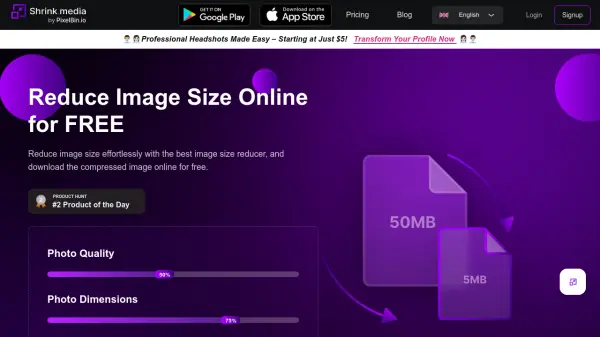
Shrink.media is an online tool designed to reduce the file size of images using intelligent compression techniques. It supports common image formats including PNG, JPG, JPEG, WEBP, and HEIC, allowing users to upload images directly or via URL. The primary goal is to decrease file size significantly while maintaining visual quality, controlled through adjustable settings for photo quality and dimensions.
By compressing images, Shrink.media helps achieve faster web page loading times, reduces bandwidth consumption, and ultimately improves the overall user experience on websites or applications where the images are used. The service is accessible via its website and dedicated mobile applications, offering both free usage and subscription options for more extensive needs, including bulk processing capabilities facilitated through PixelBin.io integration.
Features
- Intelligent Compression: Reduces file size efficiently while aiming to preserve image quality.
- Quality Control: Allows users to specify the desired photo quality percentage.
- Dimension Control: Enables users to set specific photo dimensions or resize by percentage.
- Multiple Format Support: Compresses PNG, JPG, JPEG, WEBP, and HEIC images.
- Bulk Processing: Supports batch image resizing and compression via PixelBin.io.
- Mobile App Availability: Accessible via dedicated mobile applications for Android and potentially iOS.
- URL Upload: Supports uploading images directly via URL.
Use Cases
- Optimizing website images for faster loading times.
- Reducing image file size for email attachments.
- Compressing images for social media posts.
- Saving storage space by shrinking image files.
- Preparing images for faster sharing online.
- Efficiently processing large batches of images for web development or content creation.
FAQs
-
What image formats does Shrink.media support?
Shrink.media supports PNG, JPG, JPEG, WEBP, and HEIC image types. -
How can I use Shrink.media for bulk processing?
You can batch process images using their product PixelBin.io, which offers real-time image transformations with automatic optimization, image URLs, and storage for your media library. -
What is the maximum image resolution / file size supported?
The maximum output resolution and size supported is 5000 x 5000 px and 25 MB. -
Do I need to Sign up to compress images using Shrink.media?
Yes, signing up is required for bulk image transformations and to receive free credits. You might be able to transform 1 image daily without signing up. -
How do I resize an image without losing its quality using Shrink.media?
Shrink.media uses intelligent compression techniques designed to reduce image size efficiently while maintaining the original quality as much as possible.