What is Selzee?
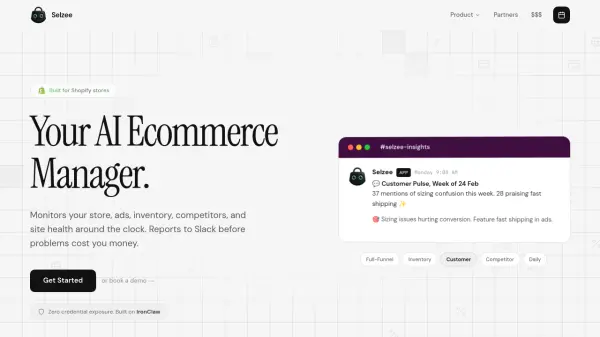
Selzee is an AI-powered ecommerce manager designed for Shopify stores. It connects to your store, ad platforms, analytics, and reviews via one-click OAuth, monitoring everything around the clock. Selzee checks your sales, ads, inventory, competitors, and site health every hour and reports directly to Slack with actionable insights. It can alert you to a CPM spike, a stockout risk, or a competitor move, along with recommended actions like budget shifts or reorder timing. You stay in control—Selzee informs, it doesn't act automatically.
Selzee integrates with Shopify, Meta Ads, Google Ads, Google Analytics, Slack, TikTok Ads, Klaviyo, and more, with 36+ integrations available. It requires no engineering setup and can be live in under 5 minutes. Pricing starts at $499 per month, making it a cost-effective alternative to a junior ecommerce analyst. Security is enterprise-grade with SOC 2 compliance, read-only permissions, and credential isolation built on IronClaw.
Features
- 24/7 Monitoring: Checks sales, ads, inventory, competitors, and site health every hour.
- Slack Alerts: Sends actionable messages to Slack before problems become costly.
- Actionable Recommendations: Not just alerts, but budget shifts, reorder timing, and fixes.
- One-Click Integrations: Connects to Shopify, Meta Ads, Google Ads, GA4, Klaviyo, and more.
- Enterprise Security: SOC 2 compliant, read-only permissions, credential isolation.
Use Cases
- Monitor ad spend and detect CPM spikes in real-time.
- Prevent stockouts by tracking inventory levels and reorder timing.
- Receive morning briefings with overnight revenue and site health updates.
- Track competitor pricing or campaign changes.
- Identify broken product pages or site issues before they impact sales.
FAQs
-
What exactly does Selzee do that my team doesn't?
Your team sleeps. Selzee doesn't. It monitors ad spend, inventory levels, competitor moves, site health, and customer sentiment around the clock. When your Meta CPM spikes at 3am or a best-seller is about to stock out, Selzee catches it and tells you in Slack before it costs you revenue. No dashboards to check, no reports to wait for. -
We already have a marketing agency. Why do we need this?
Agencies report weekly. Selzee reports hourly. Your agency won't notice a CPM spike on Tuesday night or a broken checkout on Saturday morning. Selzee will. Most of our customers use us alongside their agency and catch problems 3-5 days faster. -
$499/mo sounds cheap. What's the catch?
No catch. A junior ecommerce analyst costs $5-8k/month, works 8 hours, and needs managing. Selzee costs $499, works 24/7, and gets smarter every week. We price it so the ROI is absurdly obvious. -
What if Selzee flags something wrong?
Selzee informs, it doesn't act. Every insight is a Slack message with context and a recommendation. You decide what to do. No automated budget changes, no auto-pausing campaigns. You stay in control. -
How long before we see value?
Most stores get their first actionable insight within 24 hours. By week two, Selzee has learned your patterns well enough to catch anomalies your team would miss. The typical store finds $2-5k/month in waste or missed opportunities.