Roast your email favicon

Roast your email
Get AI Feedback on Your Emails via Screenshot

What is Roast your email?

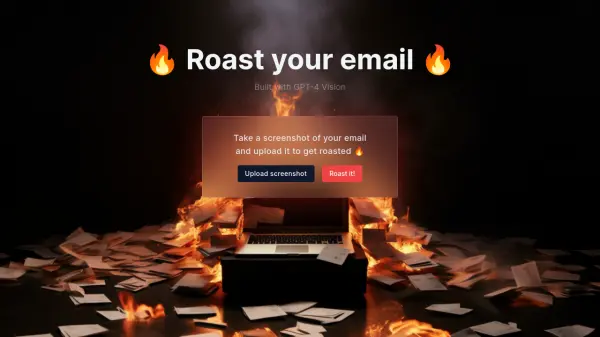
Roast your email is an AI-powered tool designed to provide feedback on email drafts. It leverages the capabilities of GPT-4 Vision to analyze screenshots submitted by users.

Users can simply take a screenshot of their email composition and upload it to the platform. The tool then processes the image and delivers a critique, often termed a 'roast', aiming to highlight areas for improvement in the email's content, tone, or structure. This process offers a unique and direct way to receive AI-driven insights on email communication effectiveness.

Features

  • GPT-4 Vision Integration: Utilizes advanced vision AI to understand email content from screenshots.
  • Screenshot Analysis: Accepts email screenshots as input for analysis.
  • Email Critique (Roast): Delivers feedback, presented as a 'roast', on the submitted email.

Use Cases

  • Getting objective feedback on email drafts before sending.
  • Improving email writing skills.
  • Understanding how an AI interprets email tone and content.
  • Quickly checking emails for potential issues.

Related Tools:

Blogs:

  • Best AI tools for Lawyers

    Best AI tools for Lawyers

    streamline legal processes, enhance research capabilities, and improve overall efficiency in the legal profession.

  • AI tools for video voice overs

    AI tools for video voice overs

    Discover the next level of video production with AI-powered voiceover tools. Enhance your content effortlessly, ensuring professional-quality narration for your videos.

  • Top 6 AI note-taking tools for 2026: in-person, online, and hybrid use cases

    Top 6 AI note-taking tools for 2026: in-person, online, and hybrid use cases

    Most AI note-taking lists are really lists of meeting bots, which join your video call and transcribe it. That's useful, but it's half the picture. Decisions happen in hallway conversations, client dinners, on-site visits, and hybrid rooms where nobody is on a video link. This guide covers different parts of the note-taking workflow: hardware capture for in-person settings, platform-native tools for online calls, and AI layers for organizing and synthesizing what you've captured. It compares six tools by capture context, workflow fit, pricing, and limitations.

Didn't find tool you were looking for?

Be as detailed as possible for better results