RemoteXY favicon

RemoteXY
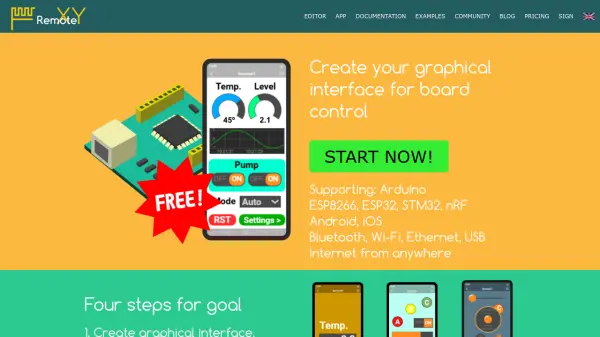
Create graphical interfaces for remote board control

What is RemoteXY?

RemoteXY provides a platform for developing graphical user interfaces to control various microcontroller boards remotely. The tool supports multiple connection methods including Bluetooth, Wi-Fi, Ethernet, and USB, allowing users to interact with their hardware projects from mobile devices or computers over the internet.

Users can create custom interfaces using the editor, download generated source code, connect wireless modules to their boards, and install mobile applications for real-time control. The platform is designed for applications ranging from robot control to smart home automation, offering flexibility for individual projects and commercial use.

Features

  • Graphical Interface Editor: Create custom interfaces for board control
  • Multiple Connection Methods: Support for Bluetooth, Wi-Fi, Ethernet, and USB
  • Board Compatibility: Works with Arduino, ESP8266, ESP32, STM32, and nRF
  • Remote Control: Control devices from anywhere via internet
  • Mobile App Integration: Install apps for iOS and Android control

Use Cases

  • Robot control with graphical interfaces
  • Smart home automation for lighting and power management
  • Remote sensor monitoring and data reading
  • Educational projects for microcontroller programming
  • Commercial IoT device control systems

Related Queries

Helpful for people in the following professions

Blogs:

  • Best AI tools for recruiters

    Best AI tools for recruiters

    These tools use advanced algorithms and machine learning to automate tasks such as resume screening, candidate matching, and predictive analytics. By analyzing vast amounts of data quickly and efficiently, AI tools help recruiters make data-driven decisions, save time, and identify the best candidates for open positions.

  • Top 6 AI note-taking tools for 2026: in-person, online, and hybrid use cases

    Top 6 AI note-taking tools for 2026: in-person, online, and hybrid use cases

    Most AI note-taking lists are really lists of meeting bots, which join your video call and transcribe it. That's useful, but it's half the picture. Decisions happen in hallway conversations, client dinners, on-site visits, and hybrid rooms where nobody is on a video link. This guide covers different parts of the note-taking workflow: hardware capture for in-person settings, platform-native tools for online calls, and AI layers for organizing and synthesizing what you've captured. It compares six tools by capture context, workflow fit, pricing, and limitations.

Didn't find tool you were looking for?

Be as detailed as possible for better results