Red Sweater Software favicon

Red Sweater Software
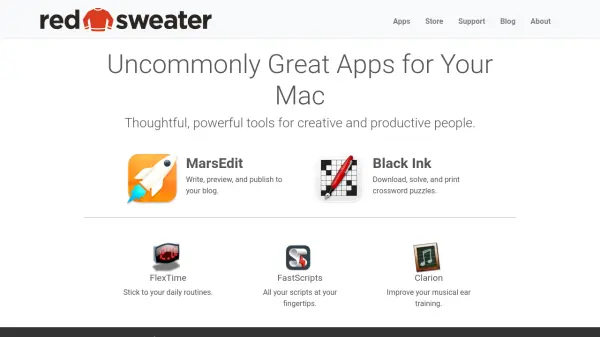
Uncommonly Great Apps for Your Mac

What is Red Sweater Software?

Red Sweater Software specializes in creating high-quality applications for Mac users, focusing on enhancing creativity and productivity. The company offers a suite of tools designed to meet specific needs, such as MarsEdit for blogging, Black Ink for crossword puzzles, FlexTime for daily routines, FastScripts for script management, and Clarion for musical ear training. Each app is crafted with attention to detail to provide reliable and user-friendly experiences.

These applications cater to a diverse audience, from writers and puzzle enthusiasts to musicians and developers, ensuring that users have access to specialized software that integrates seamlessly into their workflows. Red Sweater Software emphasizes thoughtful design and powerful functionality, making their tools valuable assets for anyone looking to optimize their Mac usage.

Features

  • MarsEdit: Write, preview, and publish to your blog
  • Black Ink: Download, solve, and print crossword puzzles
  • FlexTime: Stick to your daily routines
  • FastScripts: All your scripts at your fingertips
  • Clarion: Improve your musical ear training

Use Cases

  • Blogging and content publishing
  • Solving and printing crossword puzzles
  • Managing daily routines and schedules
  • Running and organizing scripts on Mac
  • Enhancing musical skills through ear training

Blogs:

  • Long Videos into Viral Shorts

    Long Videos into Viral Shorts

    Klap.app is an AI-powered video editing tool that transforms long-form videos into engaging short clips optimized for platforms like TikTok, Instagram Reels, and YouTube Shorts

  • Best Content Automation AI tools

    Best Content Automation AI tools

    Streamline your content creation process, enhance productivity, and elevate the quality of your output effortlessly. Harness the power of cutting-edge automation technology for unparalleled results

  • Top 6 AI note-taking tools for 2026: in-person, online, and hybrid use cases

    Top 6 AI note-taking tools for 2026: in-person, online, and hybrid use cases

    Most AI note-taking lists are really lists of meeting bots, which join your video call and transcribe it. That's useful, but it's half the picture. Decisions happen in hallway conversations, client dinners, on-site visits, and hybrid rooms where nobody is on a video link. This guide covers different parts of the note-taking workflow: hardware capture for in-person settings, platform-native tools for online calls, and AI layers for organizing and synthesizing what you've captured. It compares six tools by capture context, workflow fit, pricing, and limitations.

  • Best AI Tools For Startups

    Best AI Tools For Startups

    we've compiled a straightforward list of user-friendly AI tools designed to give startups a boost. Discover practical solutions to streamline everyday tasks, enhance productivity, and gain valuable insights without the need for a tech expert. Learn where and how these tools can be applied in your startup journey, from automating repetitive tasks to unlocking powerful data analysis. Join us as we explore the features that make these AI tools accessible and beneficial for startups in various industries. Elevate your business with technology that works for you!

Didn't find tool you were looking for?

Be as detailed as possible for better results