

What is Quixy?
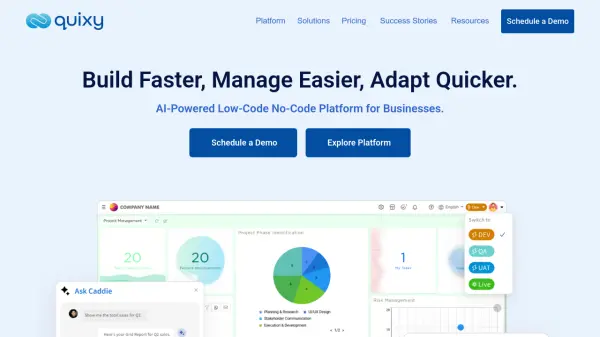
Quixy offers a robust platform combining Artificial Intelligence with Low-Code/No-Code (LCNC) capabilities, designed to empower businesses in building enterprise-grade applications. It facilitates faster development cycles and easier management, allowing users to adapt quickly to changing business needs. The platform caters to both business users and developers, providing an intuitive drag-and-drop interface for no-code development alongside low-code flexibility for advanced customization and integrations.
By leveraging AI, Quixy enables the automation of complex processes, generation of valuable insights, and the creation of intelligent applications that can learn and adapt. This approach aims to streamline workflows, integrate disparate systems, and support overall business scalability. Quixy positions itself as a comprehensive solution for digital transformation, legacy system modernization, business process management (BPM), and process optimization, reducing the reliance on traditional coding expertise for many development tasks.
Features
- AI-Powered Automation: Automates repetitive tasks, generates insights, and enhances app functionality using built-in AI.
- No-Code Development: Intuitive drag-and-drop interface for building custom apps without coding skills.
- Low-Code Flexibility: Allows developers to extend app capabilities with code for advanced customization.
- Seamless Integrations: Connects with APIs, databases, and various third-party tools.
- Caddie AI Assistant: Provides detailed reports and real-time insights to improve team productivity.
- Workflow Designer: Visual tool for creating and managing business process workflows.
- Business Rules Engine: Define and implement complex business logic and validations.
- Cross-Platform Mobile App: Access applications built on Quixy via Android and iOS devices.
- Enterprise-Grade Security: Features robust encryption, advanced protocols, and granular admin controls.
- Document Generation: Automatically create documents based on application data.
- Advanced Dashboards & Reports: Visualize data and track key performance indicators.
Use Cases
- Developing custom enterprise resource planning (ERP) systems.
- Automating business processes across various departments (HR, Finance, Sales, etc.).
- Building applications for digital transformation initiatives.
- Modernizing legacy software systems.
- Streamlining business process management (BPM) and optimization.
- Creating field service management applications.
- Developing customer service portals and tools.
- Building secure blockchain applications.
- Implementing citizen development programs within organizations.
FAQs
-
Is there any long term commitment with Quixy?
No, Quixy operates on a pay-as-you-go model based on your billing cycle. You can export your data anytime and request its deletion. -
Are there any hidden charges apart from the subscription fees?
No, there are no additional costs beyond the specified plan charges, except for optional extra storage purchases. -
What constitutes a "User" within the Quixy platform?
A "User" is defined as a single individual with unique credentials authorized to access the Quixy platform, regardless of the number of workflows they interact with or roles they fulfill. -
What is considered a "workflow action"?
A workflow action refers to any step taken by a user within a business process workflow, such as submitting a form, approving a request, or rejecting an application. -
Does Quixy count external users (e.g., clients using embedded forms) towards the user limit?
Typically, users are those who log into the system. Quixy allows embedding forms for anonymous submissions from external stakeholders without them being counted as users. Specific 'Solution' pricing plans might include packs for external portal users if needed.