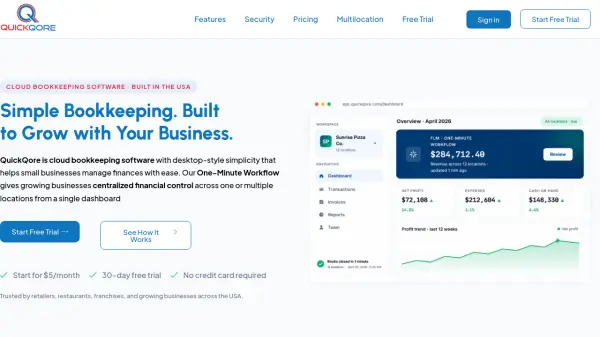
What is QuickQore?
QuickQore is cloud-based bookkeeping software designed for U.S. small businesses and growing multi-location companies. It combines desktop-style simplicity with modern automation, enabling users to manage finances for one or multiple locations from a single dashboard. Key capabilities include AI-assisted transaction categorization, OCR receipt capture, and a proprietary One-Minute Workflow that lets users capture, validate, and finalize financial data quickly.
The platform supports invoicing, expense tracking, bank reconciliation, inventory management, and customizable financial reporting. QuickQore offers multi-location accounting with location-level P&Ls, consolidated rollups, and franchisor-ready reporting. It provides bank-level security, role-based access, and two-factor authentication, and is backed by U.S.-based support from Bensalem, Pennsylvania.
Features
- AI-Assisted Bookkeeping: OCR receipt capture, automatic transaction categorization, and workflow automation with user validation.
- One-Minute Workflow: Capture, Validate, and Finalize a month of multi-location data in about sixty seconds.
- Multi-Location Command: Manage multiple entities or locations from one dashboard with location-level P&Ls and consolidated rollups.
- FLM Report: Track Food, Labor, and Mileage metrics at location, region, or rollup level for multi-unit profitability.
- Bank-Level Security: TLS encryption, AES-256 encryption at rest, two-factor authentication, role-based access, and account number masking.
- Custom Report Builder: Create and customize financial reports including P&L, balance sheet, and cash flow statements.
- Inventory Management: Track inventory across single or multiple locations (available on Pro and above plans).
- Bulk Sales Upload: Upload sales data across multiple stores efficiently.
- Franchisor-Ready Reporting: Generate reports and royalty tracking for franchise operations.
- 30-Day Free Trial: No credit card required, full access to features.
Use Cases
- Small business bookkeeping and financial management.
- Multi-location retail or restaurant chain accounting.
- Franchise financial reporting and royalty tracking.
- Freelancer or sole proprietor invoicing and expense tracking.
- CPA firms managing multiple client entities.
- Service company job costing and invoicing automation.
- Gas station and convenience store compliance and fuel-vs-store mix tracking.
FAQs
-
What is the QuickQore One-Minute Workflow?
The One-Minute Workflow helps businesses Capture, Validate, and Finalize financial data quickly from one dashboard. It reduces manual data entry and improves reporting accuracy for both single-location and multi-location businesses. -
Is QuickQore good for small businesses?
Yes. QuickQore is designed to be simple and affordable for small business owners while still offering advanced features as businesses grow. The platform includes invoicing, expense tracking, financial reporting, and cloud-based bookkeeping tools without the complexity of traditional enterprise accounting systems. -
Can QuickQore manage multiple business locations?
Yes. QuickQore includes multi-location bookkeeping tools that allow businesses to manage multiple entities, locations, or franchises from one dashboard. Users can generate location-level reports, consolidated financial statements, automate bulk sales uploads, and support FLM reporting. -
Does QuickQore offer a free trial?
Yes. QuickQore offers a 30-day free trial with no credit card required. Businesses can explore bookkeeping, invoicing, reporting, automation, and multi-location features before selecting a paid subscription plan starting at $5 per month. -
What makes QuickQore different from QuickBooks Online?
QuickQore combines desktop-style simplicity with modern cloud automation and built-in multi-location management. Unlike many traditional bookkeeping platforms, QuickQore includes centralized entity management, franchisor-ready reporting, and the proprietary One-Minute Workflow for faster financial processing.