What is PTFB Pro?
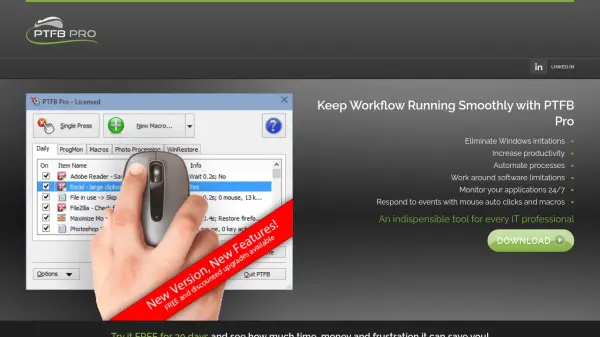
PTFB Pro is a versatile Windows automation tool designed to eliminate irritations, increase productivity, and automate processes. It combines a sophisticated mouse auto clicker with a powerful macro recorder, enabling users to automatically respond to prompts, restart unresponsive programs, restore window preferences, and perform repetitive tasks without manual intervention.
The tool sits discreetly in the system tray, monitoring applications and workflow. When it identifies a predefined situation, it instantly takes action, optionally alerting the user and logging the incident. PTFB Pro works with locked desktops, maintains security, and can dismiss screen savers to run macros. It also includes a built-in scheduler and supports external triggering via command line, making it ideal for unattended operation.
Features
- Sophisticated Mouse Auto Clicker: Handy features beyond typical auto-clickers, including recognition of buttons and links regardless of position.
- Powerful Macro Recorder: Simple intuitive interface with features for power users.
- Monitor, Alert, Resolve, Log: Monitors applications, takes instant action, optionally alerts and logs incidents.
- Automate Repetitive Tasks: Automatically responds to prompts and info requests.
- Keep Programs Running 24/7: Automatically restarts programs that hang or crash.
- Restore Preferences and Window State: Restores program preferences every time a program runs or window opens.
- Unattended Operation: Works with locked desktops, can dismiss screen savers, unlock and relock desktop.
- Built-in Scheduler: Runs tasks on a schedule or via external command line trigger.
- Logging and Alerting: All activities can be logged to text file with screenshots; email can be sent on trigger.
- Small Footprint: Quick and easy install, clean uninstall.
Use Cases
- Automate repetitive data entry and mouse clicks.
- Keep critical servers or applications running 24/7.
- Automatically log into programs or websites.
- Restart applications that have memory leaks or become unresponsive.
- Automated software testing and quality assurance.
- Resize and reposition windows automatically.
- Prevent programs from running at specified times.
FAQs
-
Can PTFB Pro work on a locked desktop?
Yes, PTFB Pro can work with locked desktops. It can dismiss the screen saver, unlock the desktop, run macros, and then relock the desktop to maintain security. -
Does PTFB Pro require scripting knowledge?
No, PTFB Pro is designed for ease of use with no steep learning curve or complicated scripting. Most tasks can be set up with a couple of button clicks. -
Can PTFB Pro automate clicking on buttons that change position?
Yes, PTFB Pro can recognize most buttons and links, not just rely on coordinates. It can find and click buttons even if the program screen is resized or laid out differently. -
Is there a free trial available?
Yes, PTFB Pro offers a 30-day free trial. You can download and try it for free before purchasing a license.