What is Pixaki?
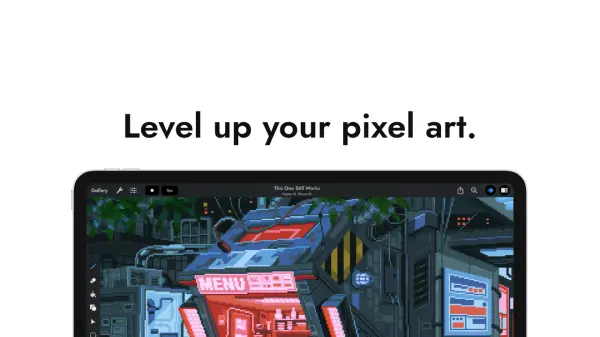
Pixaki is a dedicated pixel art app designed exclusively for the iPad, offering an impressive suite of features tailored for digital artists and animation professionals. With optimized Apple Pencil integration, users enjoy a smooth and natural drawing experience, ideal for creating game sprites, animations, backgrounds, and more—whether on the go or at home. The application supports versatile tools such as pixel-perfect painting, dither and shape brushes, advanced selection options, as well as powerful color management tools, enabling users to produce high-quality, professional pixel art with ease.
Pixaki simplifies the animation workflow with unlimited layers, shared timelines, blend modes, onion skinning, and bulk frame actions for the Pro version, while reference layer support allows for seamless tracing and overlay of sketches or photographs. Its robust import and export capabilities support major file formats, including PSD and Aseprite, and integration with iCloud Drive ensures that projects are easily stored and shared. Designed to leverage the full power of iPad hardware, Pixaki is suitable for both beginners and seasoned artists looking for a modern, intuitive pixel art creation experience.
Features
- Pixel Perfect Painting: Automatically removes double pixels during line art creation.
- Dither Brush: Offers 13 unique dithering patterns for creative pixel shading.
- Advanced Selection Tools: Includes freehand, rectangular, and color-based selection with transform options.
- Layered Animation: Unlimited layers and frames in Pro, with independent timelines and blend modes.
- Reference Layers: Import images for tracing or color sampling with adjustable opacity.
- Comprehensive Color Management: HSB, RGB sliders, hex input, eyedropper, bucket fill, and color replace modes.
- Robust Import/Export: Supports images, GIF, PNG, QuickTime, PSD, Aseprite, and sprite sheet output.
- iCloud Drive Support: Enables cloud storage and project collaboration.
- Apple Pencil Integration: Full gesture support for natural drawing experience.
- Optimized iPad Performance: Utilizes Metal graphics and allows large canvases up to 1080p.
Use Cases
- Creating game sprites for indie or professional video games.
- Designing animated pixel art backgrounds or music videos.
- Tracing and digitizing hand-drawn sketches into pixel art.
- Producing animated GIFs or sprite sheets for game engines.
- Collaborating on pixel art projects via iCloud Drive.
- Editing and refining pixel art with detailed selection and color tools.
- Exporting layered PSD files for further editing in desktop software.
- Quickly mocking up concepts for pixel art-based mobile applications.
FAQs
-
What devices does Pixaki support?
Pixaki is developed exclusively for iPad and takes full advantage of iPad's hardware and software features. -
Is there a free version of Pixaki?
Yes, Pixaki offers an Intro version that is completely free, with no time limits or ads, and is ideal for beginners. -
Which file formats can Pixaki import and export?
Pixaki supports import and export of various formats including images, GIF, PNG, QuickTime movies, layered PSD, and Aseprite formats. -
Does Pixaki support Apple Pencil?
Yes, Pixaki offers full support for Apple Pencil, including double-tap gestures and smooth, natural drawing functionality. -
Does Pixaki allow animated pixel art creation?
Yes, users can create animated pixel art with features such as unlimited layers, independent timelines, onion skinning, and bulk actions.