PicSo.ai favicon

PicSo.ai
Transform Text to AI Art and AI Portraits

What is PicSo.ai?

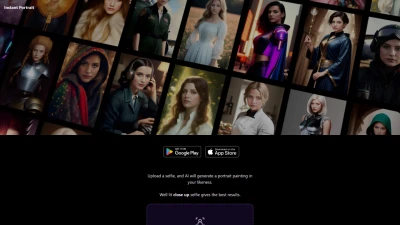
PicSo.ai is an advanced artificial intelligence tool designed to transform written text into visually stunning art and portraits. This powerful platform leverages the latest AI technology to let users craft detailed images and characters with simple text descriptions. With the ability to operate on multiple devices, users can start creating on their desktop and seamlessly transition to their mobile device, experiencing creativity without boundaries.

The tool's intuitive interface encourages users to edit, extend, or fully customize their AI-generated images to fit their specific needs. Accessible through its website, PicSo.ai offers a flexible and user-friendly way to produce unique artworks perfect for personal use, creative projects, or professional portfolios.

Features

  • Mobile Accessibility: Create art directly from your phone
  • Cross-Device Sharing: Seamlessly work between PC and mobile
  • Editing Capabilities: Edit and extend generated images

Use Cases

  • Personal digital art creation
  • Professional portfolio visual content
  • Creative projects and presentations

FAQs

  • Can I use PicSo.ai on my mobile phone?
    Yes, PicSo.ai is accessible on mobile devices, allowing users to create AI-generated artworks from their phones.
  • What editing capabilities does PicSo.ai offer?
    PicSo.ai provides users with the ability to edit and extend the generated images to customize them according to their preferences.
  • Is cross-device sharing possible with PicSo.ai?
    Yes, users can seamlessly work between their PC and mobile devices, ensuring a smooth transition while creating AI artworks.

Related Queries

Helpful for people in the following professions

Related Tools:

Blogs:

  • Top 6 AI note-taking tools for 2026: in-person, online, and hybrid use cases

    Top 6 AI note-taking tools for 2026: in-person, online, and hybrid use cases

    Most AI note-taking lists are really lists of meeting bots, which join your video call and transcribe it. That's useful, but it's half the picture. Decisions happen in hallway conversations, client dinners, on-site visits, and hybrid rooms where nobody is on a video link. This guide covers different parts of the note-taking workflow: hardware capture for in-person settings, platform-native tools for online calls, and AI layers for organizing and synthesizing what you've captured. It compares six tools by capture context, workflow fit, pricing, and limitations.

  • Best AI tools for recruiters

    Best AI tools for recruiters

    These tools use advanced algorithms and machine learning to automate tasks such as resume screening, candidate matching, and predictive analytics. By analyzing vast amounts of data quickly and efficiently, AI tools help recruiters make data-driven decisions, save time, and identify the best candidates for open positions.

  • Best Content Automation AI tools

    Best Content Automation AI tools

    Streamline your content creation process, enhance productivity, and elevate the quality of your output effortlessly. Harness the power of cutting-edge automation technology for unparalleled results

Didn't find tool you were looking for?

Be as detailed as possible for better results