What is Online Metronome?
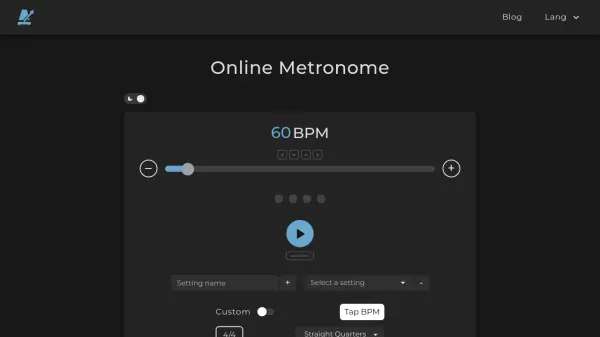
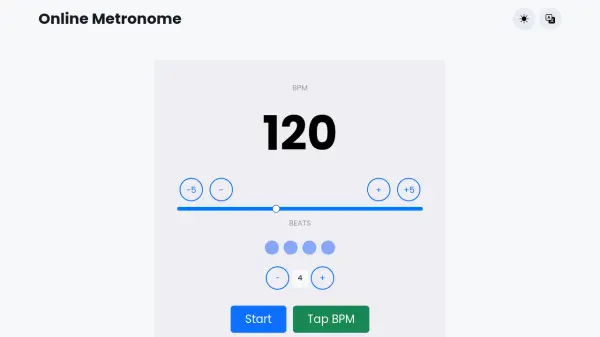
Online Metronome offers a straightforward digital metronome accessible directly through web browsers on any device. Users can adjust the tempo in beats per minute (BPM) and set the number of beats per measure from 1 to 12. The tool includes optional features such as stressing the first beat for rhythmic emphasis, a timer for timed practice sessions, and multiple sound options including click, tick, clock, wood, click 2, and drum sounds.
Additional functionality includes a subdivisions feature with 14 premade rhythms for practicing various rhythmic patterns. The interface is designed for ease of use, allowing quick adjustments with buttons or sliders. It supports multiple languages and is free to use without requiring downloads or installations.
Features
- Tempo Control: Adjust beats per minute (BPM) from 1 to 300 using buttons or a slider.
- Beat Customization: Set number of beats per measure from 1 to 12 for different time signatures.
- Sound Options: Choose from multiple sounds including click, tick, clock, wood, click 2, and drum.
- Timer Function: Set practice duration with automatic stop when timer reaches zero.
- Subdivisions: Select from 14 premade rhythms for practicing various rhythmic patterns.
- Stress First Beat: Emphasize the first beat of each measure with a different sound.
- Multi-language Support: Available in multiple languages including English, Spanish, German, and more.
- Device Compatibility: Works on any device with a web browser without installation.
Use Cases
- Practicing musical instruments at consistent tempos.
- Timing dance routines or choreography sessions.
- Athletic training with rhythmic pacing for exercises.
- Music education for teaching rhythm and timing concepts.
- Recording sessions to maintain steady tempo during performances.
- Personal practice for improving timing and rhythm skills.
FAQs
-
What is a metronome and how does it work?
A metronome is a tool that produces a steady beat to help maintain consistent tempo. It operates based on beats per minute (BPM), where each beat corresponds to a set time interval, such as 60 BPM for one beat per second. -
How do I use the subdivisions feature?
The subdivisions feature allows selection from 14 premade rhythms to practice different rhythmic patterns. Choose an option from the menu to change the beat pattern, and select the first option to return to the default one-click-per-beat setting. -
Can I use this metronome on my mobile device?
Yes, the online metronome is compatible with any device that has a web browser, including smartphones and tablets, without requiring any downloads.