What is Naview?
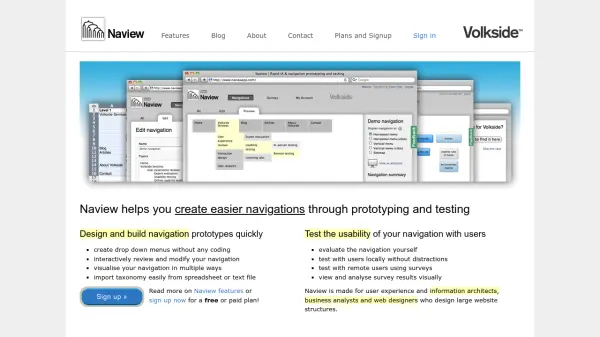
Naview streamlines the process of designing, prototyping, and testing website navigation structures, making it simple for professionals to build and modify drop-down menus without any coding required. With an interactive interface, users can visualize their navigational architecture in various layouts, easily import taxonomy data from spreadsheets or text files, and efficiently review and iterate their designs.
The platform also facilitates usability testing by allowing both self-evaluation and remote user surveys. Survey results can be analyzed visually to quickly identify navigation strengths and problem areas. Naview is ideal for user experience designers, information architects, business analysts, and web designers working on large website projects that demand robust and user-friendly navigation systems.
Features
- Rapid Prototyping: Quickly design and build navigation prototypes
- No Coding Required: Create drop-down menus without programming skills
- Interactive Modifications: Review and modify navigation interactively
- Visualization Options: View navigation structures in multiple formats
- Easy Taxonomy Import: Import navigation data from spreadsheets or text files
- Usability Testing: Evaluate navigation usability with self and user testing
- Remote Surveys: Test navigation with remote users through surveys
- Visual Survey Analysis: Analyze usability test results visually
Use Cases
- Designing navigation prototypes for large websites
- Testing new navigation layouts before website rollout
- Importing and visualizing taxonomy from structured documents
- Iterative improvement of menu labels and navigation paths
- Remote user surveys for navigation usability evaluation
- Self-assessment of site structure by information architects