
What is My Cash Wallet?
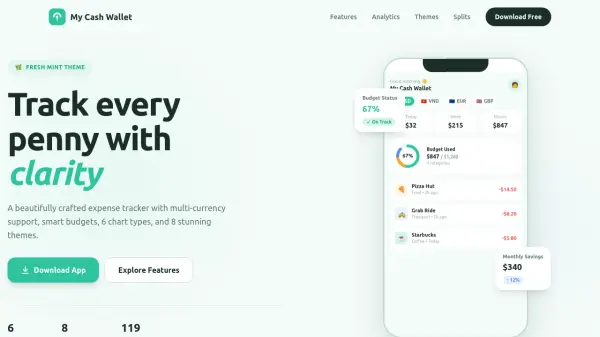
My Cash Wallet is an iOS expense tracking application designed to provide users with comprehensive financial management tools. The app features a smart dashboard that offers an at-a-glance summary of spending, including currency switching, spending cards, budget rings, and recent transactions. It supports 119 currencies, allowing users to track expenses across multiple currencies with formatted displays and per-currency totals.
The app includes per-category budgets with daily, weekly, or monthly settings, utilizing a 4-tier health system for monitoring. Users can split bills with friends through a 3-step flow, track payments, and send reminders. Additionally, My Cash Wallet offers 8 color themes for personalization and 6 chart types for analytics, such as daily bars and cumulative area charts, to visualize spending patterns effectively.
Features
- Smart Dashboard: At-a-glance summary with currency switcher, spending cards, budget ring, and recent transactions
- ATM-Style Keypad: Fast expense entry with full numeric keypad, smart currency adaption, and budget impact preview
- Per-Category Budgets: Daily, weekly, or monthly budgets with 4-tier health system, smart sorting, and safe-spend calculation
- Bill Splitting: Create, track, and settle shared expenses with 3-step flow, payment rings, and avatar stacks
- Multi-Currency: Track expenses in 119 currencies with horizontal pill switcher, flags, and per-currency totals
- 8 Color Themes: Switch between 6 light and 2 dark themes with 28 color tokens per theme for surfaces, text, and components
Use Cases
- Tracking daily expenses to manage personal finances
- Setting and monitoring budgets for different spending categories
- Splitting bills with friends or roommates for shared expenses
- Managing expenses across multiple currencies while traveling or living abroad
- Visualizing spending patterns through charts and analytics for better financial planning
FAQs
-
What is My Cash Wallet?
My Cash Wallet is an expense tracking app for iOS. Track your daily expenses, set budgets with auto-reset periods, split bills with friends, and manage budgets with ease. -
How does bill splitting work?
Create a bill split and add participants. Choose from three split methods: equal shares, custom amounts, or percentage-based. Track who has paid and who still owes, and share settlement summaries directly with participants. -
What features are included?
The app includes Bill Splitting, advanced Budgets, 8 Color Themes, 6 Chart Types, Apple Watch companion app, CSV export, home screen widgets, and 119-currency support. -
What currencies are supported?
My Cash Wallet supports 119 world currencies including USD, EUR, GBP, JPY, AUD, CNY, INR, and more. -
Does it work on Apple Watch?
Yes. The Apple Watch companion app offers a today spending summary, quick-add transactions with Digital Crown input, and a recent transactions list.