
What is monUnique?
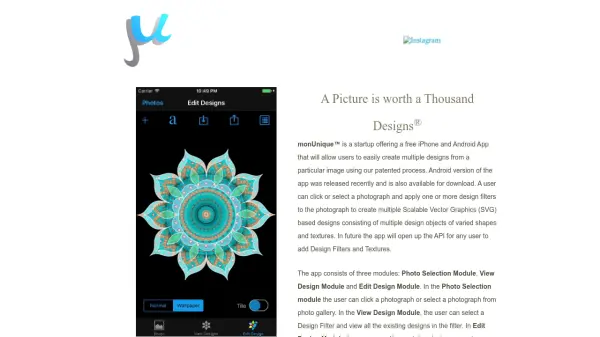
monUnique is a free mobile application available for both iPhone and Android that allows users to easily transform a photograph into multiple unique designs. By leveraging a patented process, the app converts images into Scalable Vector Graphics (SVG) consisting of varied shapes and textures. Users can select a photo from their gallery or capture one, apply design filters, and then view, edit, or create new designs. The editing module enables customization of individual design objects, including rotation, scaling, translation, flipping, and property changes such as texture, stroke color, fill, and overlay. Text objects with multiple fonts are also supported, offering similar customizable properties. Future updates will open an API for users to add their own design filters and textures.
Features
- Photo to SVG Conversion: Converts photographs into Scalable Vector Graphics (SVG) designs.
- Multiple Design Filters: Apply one or more design filters to create varied designs from a single image.
- Edit Design Module: Edit existing designs or create new ones by adding design objects from various filters.
- Object Transformations: Rotate, scale, translate, and flip design objects.
- Customizable Properties: Change texture, stroke color, fill, and overlay for design objects.
- Text Objects: Add text with multiple fonts and customize similar to design objects.
Use Cases
- Creating unique vector graphics from personal photos for digital art.
- Generating design elements for web or graphic design projects.
- Producing customizable patterns and textures for merchandise.
- Educating users on vector graphics and design principles.
FAQs
-
Is monUnique free to use?
Yes, monUnique is a free app available for iPhone and Android. -
What file format does monUnique output?
MonUnique outputs designs in Scalable Vector Graphics (SVG) format. -
Can I edit designs after applying a filter?
Yes, you can edit existing designs or create new ones by adding and modifying design objects. -
Does monUnique support text?
Yes, monUnique supports text objects with multiple fonts and customizable properties.