What is Mokker AI?
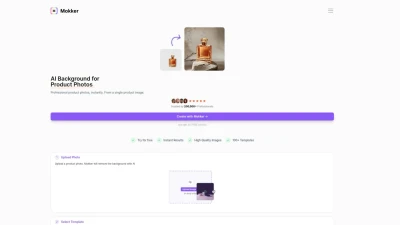
Mokker AI is an AI tool that specializes in instantly replacing backgrounds in product photos. It offers a simple and efficient solution for creating high-quality product images. Users can upload a product photo, select from a variety of templates, and let the AI work its magic to create professional product photography. Mokker AI is trusted by over 100,000 professionals and is designed to provide predictable results with high-quality images.
Features
- AI Background Replacement: Quickly remove backgrounds from product photos.
- High-Quality Images: Generate professional product images with ease.
- 100+ Templates: Choose from a wide selection of templates for different industries.
- Color Control: Control the colors of AI-generated photos to match your brand.
- Resize: Create creative assets in various formats, from website banners to stories.
Use Cases
- Enhancing Website Content
- Creating Engaging Social Media Imagery
- Generating Print-Ready Product Images
FAQs
-
What is Mokker AI?
Mokker AI is an AI-powered tool that simplifies the process of removing and replacing backgrounds in product photos, helping you create professional-looking images. -
How can I use Mokker AI for my business?
Mokker AI is ideal for enhancing product images for websites, social media, and marketing materials, ultimately helping you attract more customers. -
Do I need any design experience to use Mokker AI?
No, Mokker AI is designed to be user-friendly. You can easily create stunning product images with just a few clicks, even without any prior design experience. -
Can I customize the backgrounds and colors in my images?
Yes, Mokker AI offers various templates and color control options, allowing you to customize the images to match your brand and preferences. -
What file formats does Mokker AI support?
Mokker AI allows you to download your enhanced product images in various formats suitable for both online and print use.