Menu Translator App favicon

Menu Translator App
Understand Any Restaurant Menu

What is Menu Translator App?

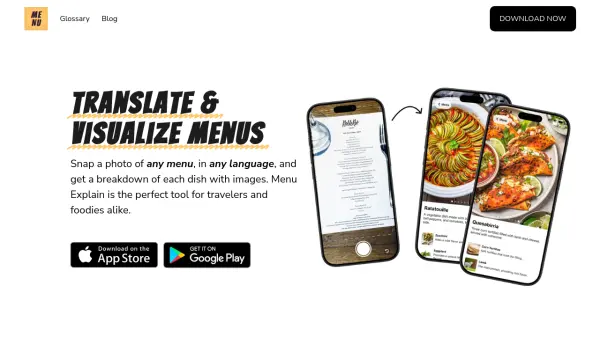
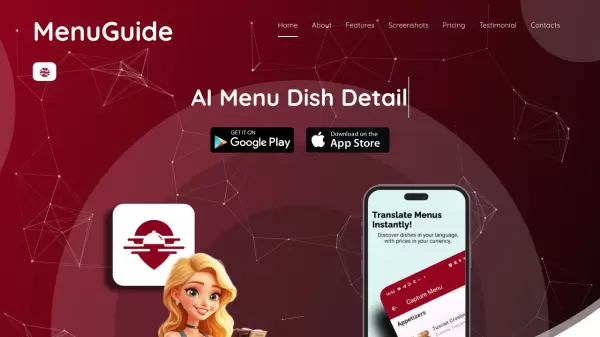
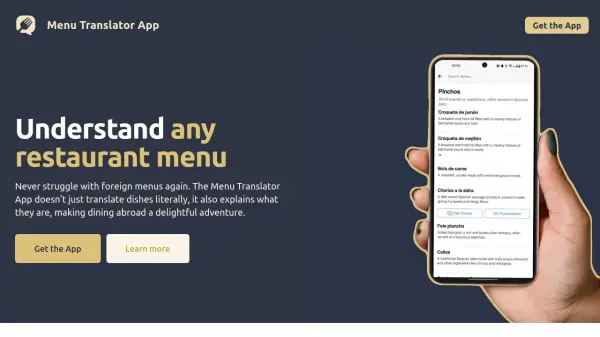
The Menu Translator App is designed to help diners understand and enjoy foreign restaurant menus. Unlike simple translation tools, this app provides detailed explanations of each dish, going beyond literal translations. This ensures users know exactly what they are ordering.

The app includes dietary restriction information, supporting vegetarian, vegan, halal, kosher, pescatarian, gluten-free, and lactose-free diets. It also allows users to search for specific ingredients, highlight dishes of interest, and listen to pronunciations for confident ordering.

Features

  • Dish Explanations: Provides detailed descriptions of menu items, not just translations.
  • Dietary Information: Displays dietary restriction estimates for various diets (vegetarian, vegan, halal, kosher, pescatarian, gluten-free, lactose-free).
  • Search Functionality: Allows users to search for specific dishes and ingredients.
  • Highlight Dishes: Enables users to long-press and highlight dishes they are interested in.
  • Pronunciation Guide: Offers audio pronunciations to help users order confidently.

Use Cases

  • International Travel: Understanding menus in foreign countries.
  • Dietary Restrictions: Identifying dishes that meet specific dietary needs.
  • Culinary Exploration: Discovering and learning about new and unfamiliar dishes.
  • Ordering with Confidence: Ensuring you know what you're ordering, even with a language barrier.

FAQs

  • How does Menu Translator App compare to other translation apps?
    With the same scanned menu, Menu Translator offers clear explanations of dishes, ensuring you understand what you're ordering — not just word-for-word gibberish. Menu Translator is specialized for menus and food items. It provides dish explanations, ingredients, and dietary restriction information, and can read handwritten menus. It is, however, not available offline.

Helpful for people in the following professions

Related Tools:

Blogs:

  • Best AI Tools For Startups

    Best AI Tools For Startups

    we've compiled a straightforward list of user-friendly AI tools designed to give startups a boost. Discover practical solutions to streamline everyday tasks, enhance productivity, and gain valuable insights without the need for a tech expert. Learn where and how these tools can be applied in your startup journey, from automating repetitive tasks to unlocking powerful data analysis. Join us as we explore the features that make these AI tools accessible and beneficial for startups in various industries. Elevate your business with technology that works for you!

  • Top 6 AI note-taking tools for 2026: in-person, online, and hybrid use cases

    Top 6 AI note-taking tools for 2026: in-person, online, and hybrid use cases

    Most AI note-taking lists are really lists of meeting bots, which join your video call and transcribe it. That's useful, but it's half the picture. Decisions happen in hallway conversations, client dinners, on-site visits, and hybrid rooms where nobody is on a video link. This guide covers different parts of the note-taking workflow: hardware capture for in-person settings, platform-native tools for online calls, and AI layers for organizing and synthesizing what you've captured. It compares six tools by capture context, workflow fit, pricing, and limitations.

  • AI Testimonial Videos: How to Build Social Proof That Actually Converts

    AI Testimonial Videos: How to Build Social Proof That Actually Converts

    AI testimonial videos are transforming marketing in 2026 by helping businesses create professional customer-style videos quickly and affordably. Using real customer reviews, short scripts, and AI tools like Pollo AI, brands can produce engaging testimonials for social media, landing pages, and ads while saving time and improving conversions.

Didn't find tool you were looking for?

Be as detailed as possible for better results