Horst Schaeffer's Software Pages favicon

Horst Schaeffer's Software Pages
Portable Windows tools for batch processing and console operations

What is Horst Schaeffer's Software Pages?

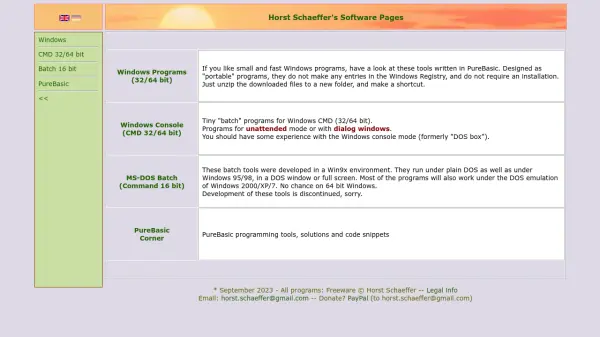
Horst Schaeffer's Software Pages provides a suite of Windows programs developed in PureBasic, focusing on portability and efficiency. These tools are designed as portable applications, meaning they do not require installation or make registry entries, allowing users to simply unzip files and create shortcuts for immediate use. The collection includes programs for Windows CMD (32/64 bit) and MS-DOS batch (16 bit), catering to users with experience in console mode operations.

The Windows CMD tools are optimized for both unattended mode and dialog windows, while the MS-DOS batch programs were developed for Win9x environments and may run under DOS emulation in newer Windows versions, though development for these is discontinued. All programs are offered as freeware, with legal information and donation options available via PayPal.

Features

  • Portable Programs: No installation or registry entries required, just unzip and use
  • Windows CMD Tools: Tiny batch programs for 32/64 bit Windows console with unattended and dialog modes
  • MS-DOS Batch Tools: 16-bit programs for Win9x environments, compatible with DOS emulation in newer Windows
  • PureBasic Development: Programs written in PureBasic for efficiency and speed
  • Freeware: All tools are free to use with legal information provided

Use Cases

  • Automating batch processes in Windows console mode
  • Running portable tools without installation on Windows systems
  • Managing legacy MS-DOS batch operations in emulated environments
  • Developing or using small, fast Windows programs for specific tasks
  • Learning or applying PureBasic programming techniques

Blogs:

  • Top 6 AI note-taking tools for 2026: in-person, online, and hybrid use cases

    Top 6 AI note-taking tools for 2026: in-person, online, and hybrid use cases

    Most AI note-taking lists are really lists of meeting bots, which join your video call and transcribe it. That's useful, but it's half the picture. Decisions happen in hallway conversations, client dinners, on-site visits, and hybrid rooms where nobody is on a video link. This guide covers different parts of the note-taking workflow: hardware capture for in-person settings, platform-native tools for online calls, and AI layers for organizing and synthesizing what you've captured. It compares six tools by capture context, workflow fit, pricing, and limitations.

  • Best AI Tools For Startups

    Best AI Tools For Startups

    we've compiled a straightforward list of user-friendly AI tools designed to give startups a boost. Discover practical solutions to streamline everyday tasks, enhance productivity, and gain valuable insights without the need for a tech expert. Learn where and how these tools can be applied in your startup journey, from automating repetitive tasks to unlocking powerful data analysis. Join us as we explore the features that make these AI tools accessible and beneficial for startups in various industries. Elevate your business with technology that works for you!

  • AI Testimonial Videos: How to Build Social Proof That Actually Converts

    AI Testimonial Videos: How to Build Social Proof That Actually Converts

    AI testimonial videos are transforming marketing in 2026 by helping businesses create professional customer-style videos quickly and affordably. Using real customer reviews, short scripts, and AI tools like Pollo AI, brands can produce engaging testimonials for social media, landing pages, and ads while saving time and improving conversions.

  • AI thumbnail maker tools

    AI thumbnail maker tools

    Automatically generate visually appealing and optimized thumbnails for various digital content, streamlining the design process and enhancing visual engagement

Didn't find tool you were looking for?

Be as detailed as possible for better results